Windows XP Windows 7 Windows 2003 Windows Vista Windows 綜合教學 Linux 系統教學
Windows 10 Windows 8 Windows 2008 Windows NT Windows Server 電腦軟體教學
您现在的位置: Windows教程網 >> Windows教程 >  >> Windows 綜合教學 >> 關於 Windows

Win10 如何關閉動作中心?註冊表新增 DisableNotificationCenter DWORD 值設為 1 即可徹底停用

編輯:關於 Windows

適用場景

不需要動作中心 (通知中心/快速動作) 功能,想徹底關閉以減少資源佔用或避免誤觸。
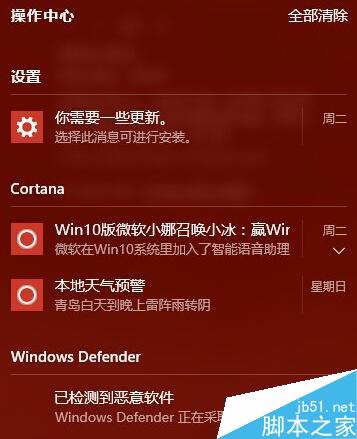
動作中心介面

註冊表修改步驟

  1. Win+R → regedit 開啟登錄編輯器。
  2. 定位路徑:
    HKEY_CURRENT_USER\SOFTWARE\Policies\Microsoft\Windows\Explorer
    (若 Policies、Microsoft、Windows、Explorer 任一層級不存在,右鍵新增金鑰逐層建立)。
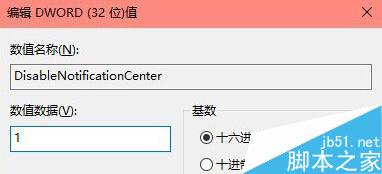
  3. 在 Explorer 金鑰下,右鍵空白處 → 「新增」→ 「DWORD (32 位元) 值」,命名 DisableNotificationCenter。
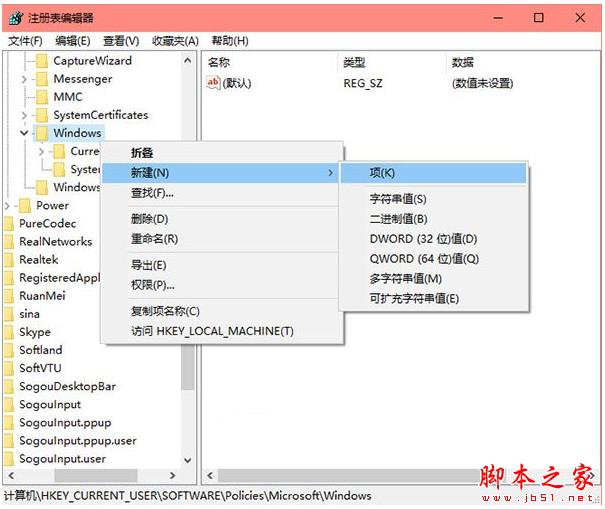
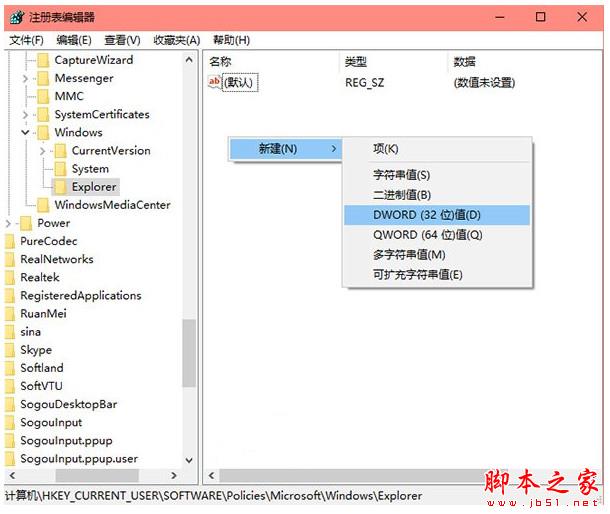
  4. 雙擊修改「數值資料」為 1 (十六進位/十進位皆可) → 「確定」。

登錄編輯器 Explorer 路徑

新增 DisableNotificationCenter

設定數值 1

生效方式

  • 登出並重新登入,或重新開機。
  • 動作中心圖示從工作列消失,Win+A 快捷鍵失效,通知與快速動作功能徹底停用。

恢復方法

將 DisableNotificationCenter 數值改為 0 或直接刪除該值,重新登入即恢復。

Copyright © Windows教程網 All Rights Reserved