Windows XP Windows 7 Windows 2003 Windows Vista Windows 綜合教學 Linux 系統教學
Windows 10 Windows 8 Windows 2008 Windows NT Windows Server 電腦軟體教學
您现在的位置: Windows教程網 >> Windows教程 >  >> Windows 綜合教學 >> 關於 Windows

Win10 安裝 KB3132372 導致瀏覽器崩潰?立即更新 KB3133431 修正 Flash 問題

編輯:關於 Windows

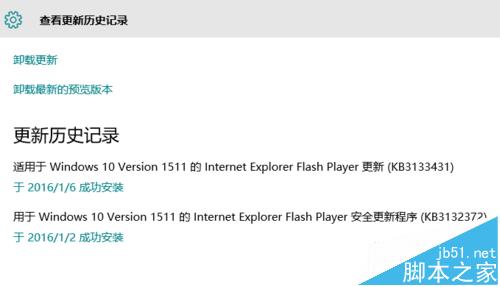
微軟 2015 年 12 月推出的 KB3132372 旨在修復 Adobe Flash Player 漏洞,但卻導致 Edge、IE 及所有 IE 核心瀏覽器崩潰、卡死、空白。微軟緊急釋出 KB3133431 修正此問題,使用者應立即安裝新補丁並移除舊補丁。

解決步驟

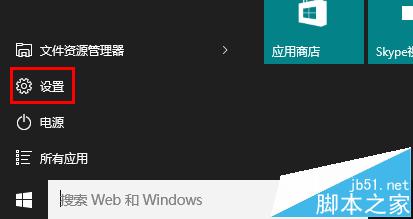
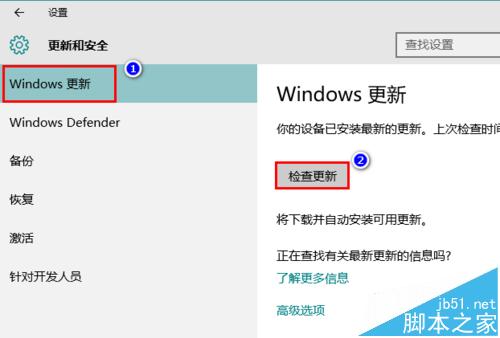
  1. 開啟「設定」→「更新與安全性」→「Windows Update」。
  2. 點擊「檢查更新」,系統將自動下載並安裝 KB3133431。
  3. 重要:安裝新補丁前,建議先至「控制台 → 程式和功能 → 檢視已安裝的更新」移除 KB3132372,避免衝突。
  4. 完成安裝後重開機,瀏覽器崩潰問題即可解決。

官方確認 KB3132372 有問題

KB3133431 修正補丁

設定開啟更新

更新與安全性

檢查更新

後台下載更新

修正後瀏覽器正常

Copyright © Windows教程網 All Rights Reserved