Windows XP Windows 7 Windows 2003 Windows Vista Windows 綜合教學 Linux 系統教學
Windows 10 Windows 8 Windows 2008 Windows NT Windows Server 電腦軟體教學
您现在的位置: Windows教程網 >> Windows教程 >  >> Windows 綜合教學 >> 關於 Windows

Win8.1 啟用失敗 0xC004F210 / 0xC004E002?重置授權狀態指令修復後重新啟用

編輯:關於 Windows

Windows 8.1 啟用時出現錯誤代碼 0xC004F210 (軟體授權服務報告授權狀態無效) 或 0xC004E002 (授權狀態資料損毀)。透過命令提示字元重置授權資料庫後重新啟用即可解決。
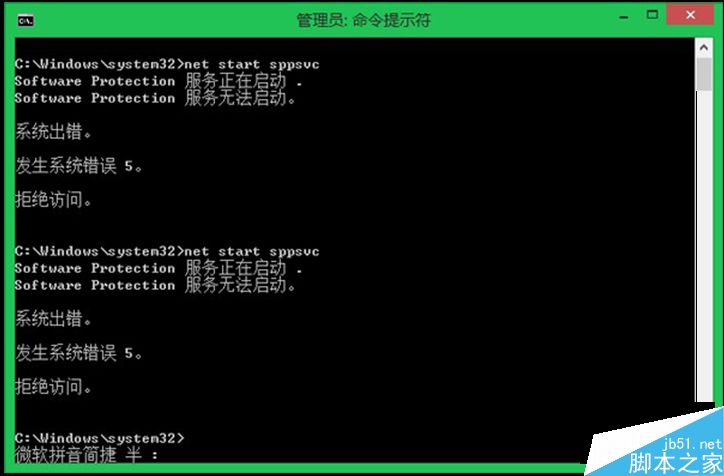
修復指令序列 (需管理員權限)

  1. Win + X → 「命令提示字元 (管理員)」或「Windows PowerShell (管理員)」。
  2. 依序執行以下指令,每行按 Enter:
net stop sppsvc
cd %windir%\ServiceProfiles\LocalService\AppData\Local\Microsoft\WSLicense
ren tokens.dat tokens.bar
net start sppsvc
cscript.exe %windir%\system32\slmgr.vbs /rilc
  1. 重新開機電腦。
  2. 開機後再次以管理員身分開啟命令提示字元,執行:
    slui 3
  3. 彈出啟用視窗,輸入產品金鑰或連線網路自動啟用。

指令解析

指令作用
net stop sppsvc停止軟體保護服務 (Software Protection Service)
ren tokens.dat tokens.bar備份損毀的授權權杖資料庫
net start sppsvc重新啟動服務,自動重建 tokens.dat
slmgr.vbs /rilc重新安裝系統授權憑證
slui 3開啟圖形化啟用介面

適用情境

  • 硬體大幅變更 (更換主機板/CPU) 導致啟用失效。
  • 使用第三方啟用工具 (KMS/MAK 破解) 後遺留異常狀態。
  • 系統還原/備份還原導致授權狀態不一致。

注意事項

  • 請使用正版授權金鑰啟用,支援 Microsoft 持續提供安全更新。
  • 企業版大量授權 (VL) 環境請聯繫 IT 管理員透過 KMS/ADBA 啟用。
Copyright © Windows教程網 All Rights Reserved