Windows XP Windows 7 Windows 2003 Windows Vista Windows 綜合教學 Linux 系統教學
Windows 10 Windows 8 Windows 2008 Windows NT Windows Server 電腦軟體教學
您现在的位置: Windows教程網 >> Windows教程 >  >> Windows 綜合教學 >> 關於 Windows

Windows 7 解除安裝迅雷影音後仍彈出「影音資訊」?刪除殘留檔案徹底清除

編輯:關於 Windows

Windows 7 解除安裝迅雷影音後仍定時彈出「影音資訊」視窗,因殘留檔案 KKTIP.EXE 仍在執行。

徹底清除步驟

  1. 彈出視窗時開啟工作管理員結束 KKTIP.EXE 程序確認來源。
  2. C 盤搜尋 KKTIP 定位至 C:\Users\Public\Video Legend\RBC\Program,需刪除整個 Video Legend 資料夾。
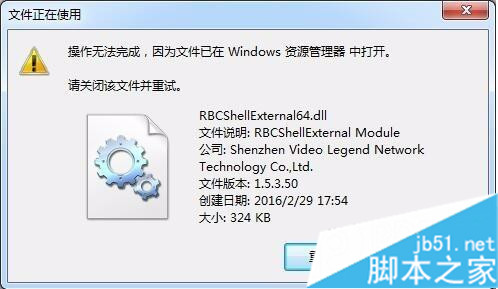
  3. 刪除時提示 RBCShellExternal64.dll 被 explorer.exe 鎖定無法刪除:
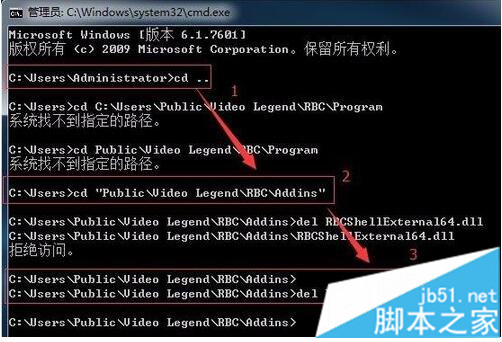
    ① 開啟命令提示字元 cd C:\Users\Public\Video Legend\RBC\Addins
    ② 準備 del RBCShellExternal64.dll 不按 Enter
    ③ 工作管理員結束 explorer.exe 程序
    ④ 回車執行刪除指令
    ⑤ 檔案刪除成功後可在工作管理員「檔案」→「執行新工作」輸入 explorer.exe 恢復桌面。
  4. 最後刪除 C:\Users\Public\Video Legend 整個資料夾。

清除殘留資料夾後不再彈出「影音資訊」視窗。

Copyright © Windows教程網 All Rights Reserved