重新安裝系統時最頭痛的就是找不到原本的產品金鑰。其實 Windows 會將已安裝的金鑰資訊加密儲存在登錄檔中,我們可以透過一段 VBScript 自動解碼並提取,一鍵備份到桌面文字檔。本文提供完整程式碼與使用教學,適用於 Windows 7、8.1、10 所有版本。
將下列程式碼複製到記事本,另存為 BackupKey.vbs(副檔名務必為 .vbs),雙擊執行即可:
Option Explicit
Dim objshell, path, DigitalID, Result
Set objshell = CreateObject("WScript.Shell")
' 登錄路徑
Path = "HKLM\SOFTWARE\Microsoft\Windows NT\CurrentVersion\"
' 讀取加密的 DigitalProductId
DigitalID = objshell.RegRead(Path & "DigitalProductId")

Dim ProductName, ProductID, ProductKey, ProductData
' 讀取產品名稱、ID
ProductName = "系統名稱:" & objshell.RegRead(Path & "ProductName")
ProductID = "產品ID:" & objshell.RegRead(Path & "ProductID")
ProductKey = "已安裝密鑰:" & ConvertToKey(DigitalID)

ProductData = ProductName & vbNewLine & ProductID & vbNewLine & ProductKey

' 詢問是否存檔
If vbYes = MsgBox(ProductData & vbLf & vbLf & "要將密鑰保存到文件嗎?", vbYesNo + vbQuestion, "Windows密鑰信息") Then
    Save ProductData
End If

' 二進位轉換為 25 字元金鑰格式
Function ConvertToKey(Key)
    Const KeyOffset = 52
    Dim isWin10, Maps, i, j, Current, KeyOutput, Last, keypart1, insert
    ' 判斷是否為 Windows 10(位元 66)
    isWin10 = (Key(66) \ 6) And 1
    Key(66) = (Key(66) And &HF7) Or ((isWin10 And 2) * 4)
    i = 24
    Maps = "BCDFGHJKMPQRTVWXY2346789"
    Do
        Current = 0
        j = 14
        Do
            Current = Current * 256
            Current = Key(j + KeyOffset) + Current
            Key(j + KeyOffset) = (Current \ 24)
            Current = Current Mod 24
            j = j - 1
        Loop While j >= 0
        i = i - 1
        KeyOutput = Mid(Maps, Current + 1, 1) & KeyOutput
        Last = Current
    Loop While i >= 0
    ' Win10 金鑰格式需插入 "N"
    If (isWin10 = 1) Then
        keypart1 = Mid(KeyOutput, 2, Last)
        insert = "N"
        KeyOutput = Replace(KeyOutput, keypart1, keypart1 & insert, 2, 1, 0)
        If Last = 0 Then KeyOutput = insert & KeyOutput
    End If
    ConvertToKey = Mid(KeyOutput, 1, 5) & "-" & Mid(KeyOutput, 6, 5) & "-" & Mid(KeyOutput, 11, 5) & "-" & Mid(KeyOutput, 16, 5) & "-" & Mid(KeyOutput, 21, 5)
End Function

' 儲存至桌面文字檔
Function Save(Data)
    Dim fso, fName, txt, objshell, UserName
    Set objshell = CreateObject("WScript.Shell")
    UserName = objshell.ExpandEnvironmentStrings("%UserName%")
    fName = "C:\Users\" & UserName & "\Desktop\Windows密鑰備份.txt"
    Set fso = CreateObject("Scripting.FileSystemObject")
    Set txt = fso.CreateTextFile(fName, True)
    txt.WriteLine Data
    txt.Close
End Function
BackupKey.vbs,編碼選 ANSI 或 UTF-8,存放在桌面。BackupKey.vbs 執行。Windows密鑰備份.txt。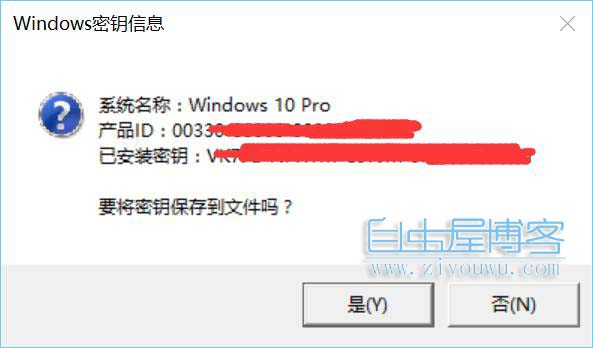
這段 VBS 腳本無需安裝任何第三方軟體,純系統原生技術提取金鑰,安全可靠。無論是個人重灌備份,還是 IT 管理員盤點授權資產,都是極佳的輕量級工具。建議趁系統正常時執行一次,備份金鑰備查。