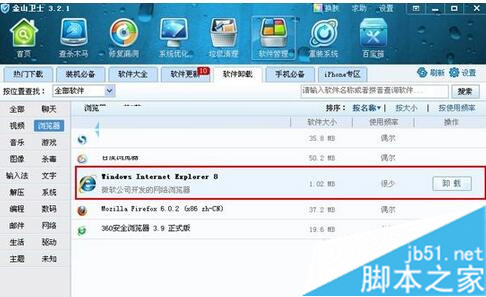
Internet Explorer 8 是 Windows 7 系統內建元件,無法像一般程式直接從「程式和功能」解除安裝。若改用第三方瀏覽器 (Chrome、Firefox 等) 並想移除 IE8,可透過「開啟或關閉 Windows 功能」或第三方工具 (如金山衛士) 執行。
同樣方法也適用於移除 IE9 等其他系統內建元件。若未安裝金山安全套裝,可前往官網下載。
虛擬光碟機掛載 Win7/XP ISO 安裝系統完整流程(PE 環境)
Win10 語音包安裝與激活完整圖文教程(含 KMS 激活工具)
Win10 設定靜態 IP:設定 → 網路與網際網路 → 更改介面卡選項 → 右鍵介面卡 → 內容 → IPv4 → 手動輸入 IP/子網路遮罩/閘道/DNS
Win8 如何設定固定 IP 位址?圖文教學與 Win7 大同小異
Win7 通知區域圖示不顯示?用 360 人工服務一鍵修復
Win10 預覽版 9879 新特性速覽:五大介面變革一次掌握
Win10 來賓帳號開啟/關閉圖文教學
Windows 10 移除內建應用程式完整指南:PowerShell 單指令批次卸載郵件、Xbox、OneNote 等預裝 App