Windows 7 自動更新安裝完成後,會反覆彈出「重新啟動電腦」提示,干擾工作。透過群組原則可針對已登入使用者停用此排程重啟提示。
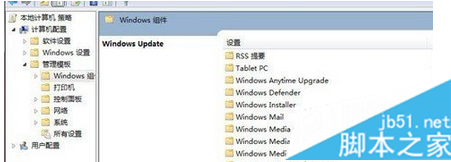
gpedit.msc 開啟群組原則編輯器。電腦設定 → 系統管理範本 → Windows 元件 → Windows Update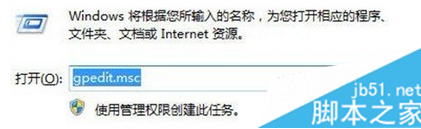
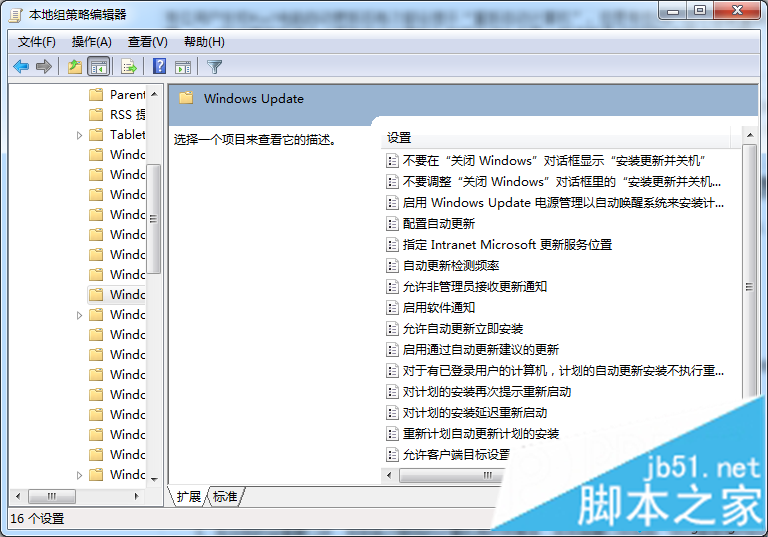
設定生效後,自動更新不會再強制彈出重啟提示,使用者可自行選擇重啟時機。
Win 8.1 修復不可用 Flash Player 外掛步驟:覆蓋系統檔案並註冊 OCX
Win10 RTM 升級 C 槽空間不足解決方案:支援 USB/外接硬碟暫存
Windows 10 本機帳戶切換為 Microsoft 帳戶登入的完整圖文教學
如何啟用 Win10?專業版/企業版等啟用方法與金鑰整理(僅供技術討論)
重裝 Win8 純淨版提示「請用管理員權限執行」?硬碟安裝法搭配右鍵以管理員身分執行解決
Win10 切換帳戶出現 0x80070057 錯誤?兩大解法:強制切換用戶與網路環境排查