Win8應用商店無法開啟,常因更新元件異常或DNS解析失敗。提供兩套標準解法:
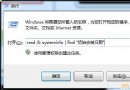
net stop wuauserv
ren %windir%\SoftwareDistribution SoftwareDistribution.old
net start wuauserv
完成後重新開啟應用商店測試。
4.2.2.14.2.2.2套用後重新進入商店。
請提供所在地、網通業者,並收集三份日誌檔:%SYSTEMROOT%\windowsupdate.log、%Temp%\WinStore.log、%UserProfile%\AppData\Local\Packages\WinStore_cw5n1h2txyewy\AC\Temp\WinStore.log 以利深入分析。
Windows 10 夏季發布:盜版也能免費升級,騰訊/360/聯想/小米四大管道全解析
微軟釋出 Windows Server Technical Preview 2 給 TechNet 訂閱者下載
Win8.1 開機黑屏伴隨主板蜂鳴聲?記憶體/硬體故障完整排查指南
XP 系統安裝 IE 提示「已安裝更新版本」解決方法:移除舊版再重裝
Windows 7 解除安裝 Windows Virtual PC 虛擬機教學
Win10 遠端桌面連線緩慢卡頓?一行 CMD 指令關閉 TCP 自動調諧解決