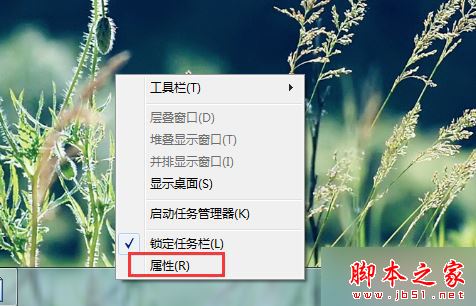
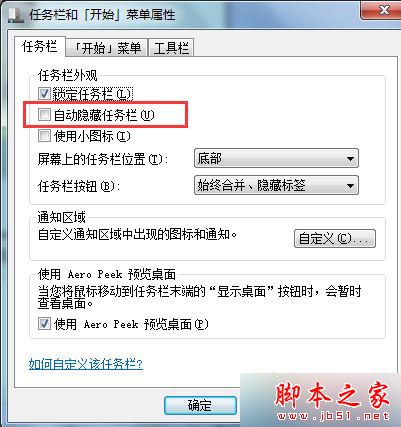
Windows 7 旗艦版開機後工作列自動隱藏,必須將滑鼠移至螢幕底部才會彈出。此為 「自動隱藏工作列」選項被啟用 所致,關閉即可恆顯工作列。本文提供圖文設定步驟。
• Win7 旗艦版設定開機密碼提示 Windows 無法變更密碼解決方法
適用範圍: Win7 所有版本、Win8/8.1/10 (介面略異,邏輯相同:設定 → 個人化 → 工作列 → 工作列行為 → 關閉自動隱藏)。
Win10 預覽版 9933 官方下載地址:快速通道 Awesome 版本,慢速通道對應 9932
Windows 7 開啟虛擬 WiFi 熱點(SoftAP)功能:免路由器共享上網完整教學
Win7 桌面圖示全變成 Windows Media Player?註冊表修復檔案關聯錯誤教學
微軟公布 Win10 通用商店更新:暢銷排行、應用內購顯示、折扣標示、開發者作品集、簡化購買流程
Win10 設定固定時間無操作自動睡眠:系統 → 電源與睡眠 圖文教學
Windows XP 隱藏光碟機 使用時再啟用註冊表技巧
Windows XP 系統建立 L2TP VPN 連線完整圖文教學
Win7 正確使用內建聲卡的 USB 喇叭?設定預設播放裝置完整教學