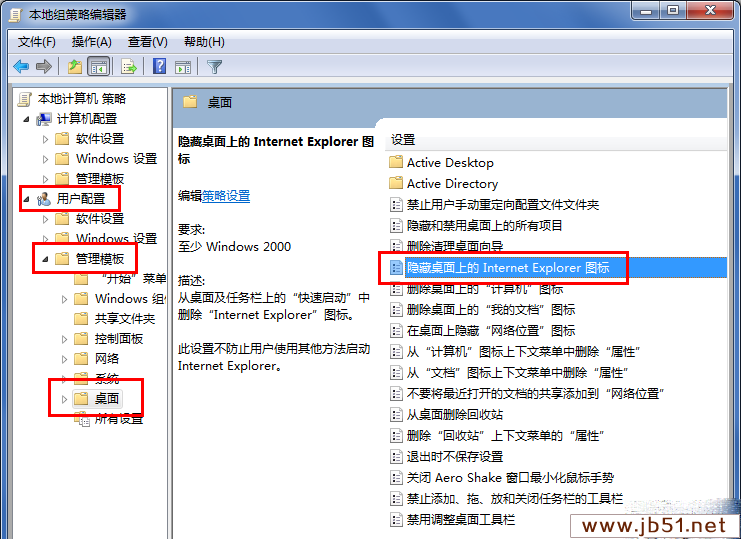
gpedit.msc
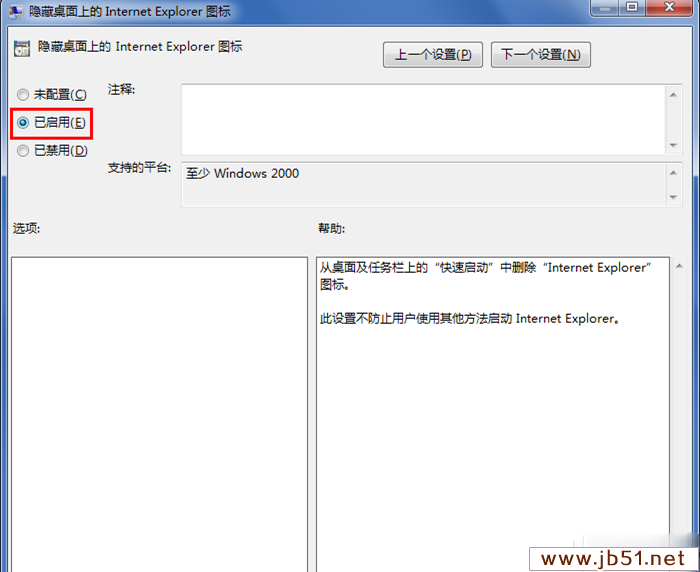
桌面 IE 圖示立即隱藏(不刪除程式)。若需顯示,將原則設為「未設定」或「已停用」。
HKEY_CURRENT_USER\Software\Microsoft\Windows\CurrentVersion\Policies\Explorer\NoInternetIcon = 1 (DWORD)
Windows 10 伺服器版多張截圖曝光:管理工具豐富、安裝流程詳細
Win7 Aero 主題全灰無法選擇?啟用 Themes 服務即可恢復
Windows 記憶體診斷工具使用教學:快速偵測記憶體條故障導致的藍屏、重開機
Win10 裝 KB3114409 後 Outlook 2010 僅能安全模式啟動?卸載該更新即可恢復,微軟已撤回
Windows Server 2012 激活完整教學:試用版轉正式版、正式版啟用、版本間轉換 DISM 指令詳解
三大升級路徑全解析:Win7/8.1 免費升級 Win10 TH2 正式版圖文總教程
Windows 7 滑鼠懸停自動啟用視窗:輕鬆存取設定啟用
Win10 Build 10565 Edge 更新日志与已知问题:标签预览/同步/拖拽上传,实验性 JS 失效