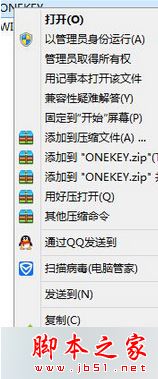
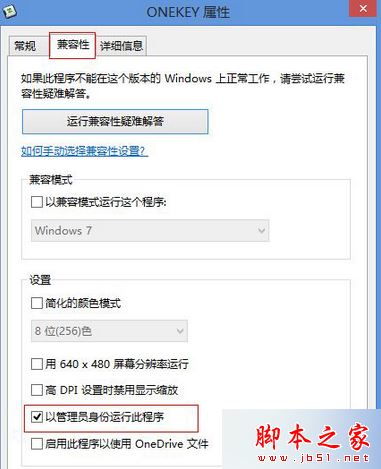
Win8.1 開啟特定程式提示「目前使用者為受限使用者」,因程式需管理員權限執行。設定相容性「以管理員身分執行此程式」即可永久解決。
設定後該程式永久以管理員身分啟動,無需每次手動右鍵選擇。
安裝 Win7 後必做的五項系統優化:關閉 UAC、關閉自動更新、設定虛擬記憶體、轉移暫存檔、更改使用者資料路徑
Windows 8 如何取得檔案/資料夾完整控制權限?安全性頁籤進階設定完整教學
Win7 無法同時播放兩個聲音?關閉「獨佔模式」即可多聲音混音
Windows 7 內建虛擬 WiFi 熱點分享上網完整教學:netsh 指令 + ICS 共享
Win8 查看 WiFi 流量使用情況內建功能:免裝第三方軟體監控流量
Win7 連不上網提示「預設閘道不可用」?啟用 FIPS 相容性修復
Win8 內建「PC 語點」語音助手完整使用教學
Win10 開始選單、工作列、音量、網路圖示左鍵無反應?PowerShell 重註冊 AppX 修復教學