重裝 Win7 系統後支付寶介面無法開啟,明明已安裝數位憑證卻自動關閉登入頁面。解決方法為關閉使用者帳戶控制 (UAC) 並設定 IE 信任網站安全性等級。
解決步驟
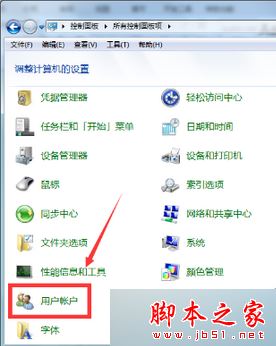
- 開啟「控制台」→ 檢視方式切換「大圖示」→「使用者帳戶」→「使用者帳戶控制設定」。
- 取消勾選「使用使用者帳戶控制 (UAC) 協助保護您的電腦」,確定,依提示重開機。

- 若使用 IE7:「工具」→「網際網路選項」→「安全性」標籤 →「信任的網站」加入
https://www.alipay.com。
- 回到「安全性」標籤,將該區域安全性等級拉到最低,確定。
相關閱讀
- Win10 無法安裝支付寶數位憑證故障原因及解決方法
簡單幾步驟即可解決重裝 Win7 後支付寶自動關閉問題,建議依序操作!