Win7 下 IE 開啟緩慢,常因「自動偵測設定」導致延遲。關閉該選項可顯著提升啟動與載入速度。
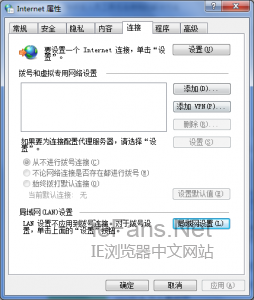
圖 1:工具 → 網際網路選項
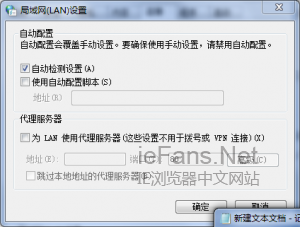
圖 2:連線分頁 → 區域網路設定
圖 3:取消勾選自動偵測設定
適用情境:企業內網無 WPAD 伺服器、家用環境直接撥號/路由器上網者。若企業環境需自動偵測 Proxy,請勿關閉。
Win7 註冊表優化:加快開機、關機、選單響應速度
Win10 移除 Windows 元件精簡系統功能
安裝 Win8 時使用 Diskpart 命令分區完整教學:無 100MB 系統保留分區、即時生效、無需重開機
Windows Server 2008 Core 管理五大實用技巧:解析度、提示字元、啟用、遠端管理、UAC
Windows 10 透過群組原則禁止 USB 隨身碟/可移動裝置連接教學
Win10 10159 更新內容彙總:300+ Bug 修復、新英雄桌布、鎖屏桌布、登入介面調整
Win10 內建應用程式怎麼移除?PowerShell 指令批次解除安裝預裝 App 完整清單(含 Xbox 刪除錯誤說明)
Win7 藍屏錯誤代碼 0x0000007A 三大排查方向(硬碟、病毒、記憶體)