Windows 10 預設限制 TCP/IP 半開連線數 (預設 11) 導致網頁瀏覽、下載卡頓。透過登錄表關閉限制即可改善。
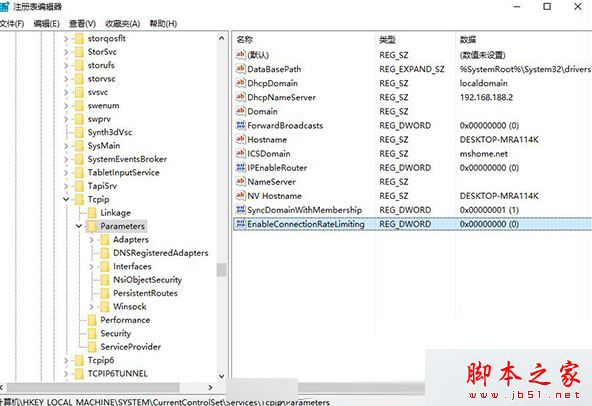
regedit
HKEY_LOCAL_MACHINE\SYSTEM\CurrentControlSet\Services\Tcpip\Parameters
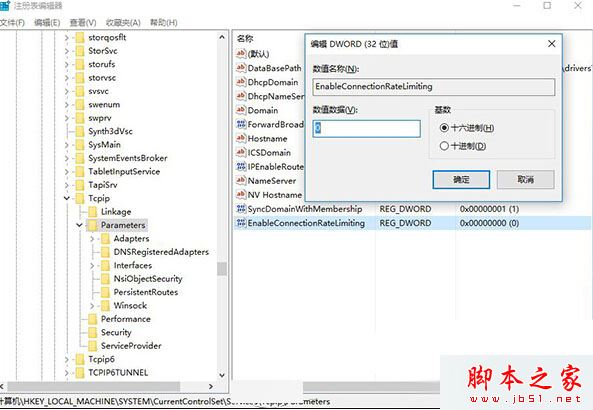
EnableConnectionRateLimiting
0
修改後 TCP/IP 連線數不再受限,網頁載入與下載速度將明顯改善。
Win7 開網頁顯示亂碼?瀏覽器編碼設定「自動選擇」一鍵修正
Win10 10130 系統右鍵「內容」消失?群組原則恢復「此電腦」右鍵選單
安裝Win7/8.1後卡在「正在啟動Windows」?BIOS啟用CSM兼容模組支援UEFI+Legacy雙啟動
Win8 藍屏代碼查詢器使用教程:記錄代碼、查詢原因、直達微軟官方方案
Win10 Mobile 10586.312 試用體驗:Edge 更新、速度稍快、波蘭語詞典問題仍在
XP 開機到捲動條就重開機?進入安全模式移除新裝軟體/驅動與清理啟動項教學
雙系統移除 Win7 後刪除開機選單殘留項目方法
Windows 8.1 升級 Windows 10 (32/64位) 完整步驟教學