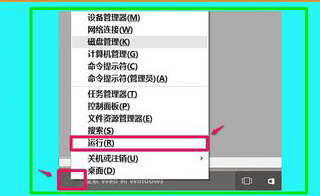
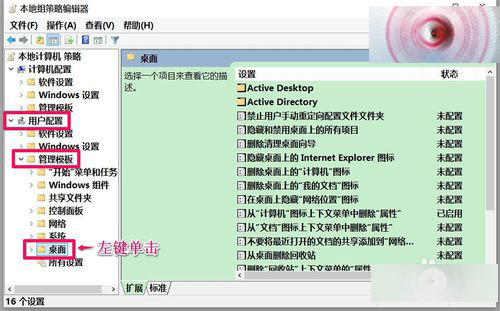
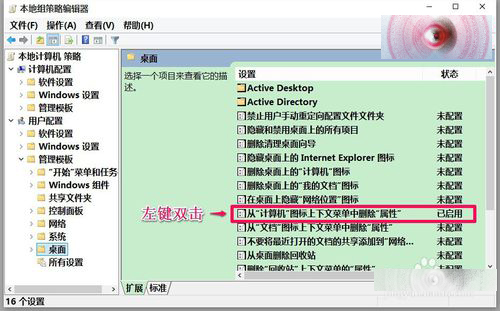
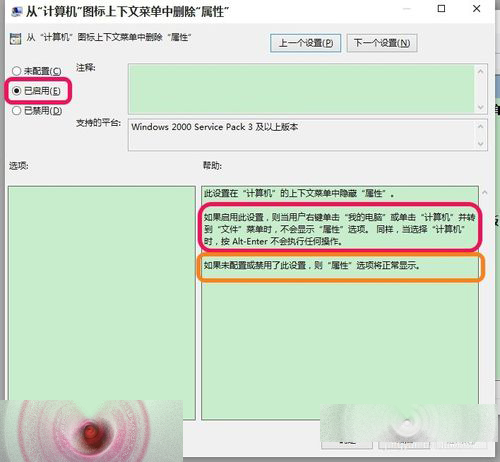
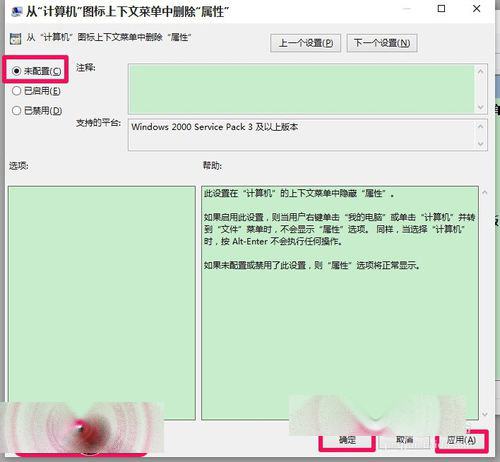
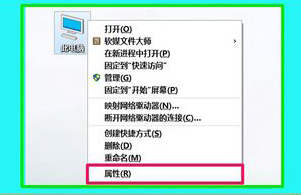
Build 10130 桌面右鍵「此電腦」缺少「內容」選項,修復法:
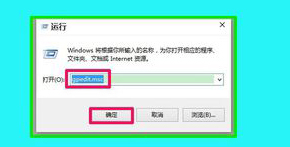
gpedit.msc
此為預覽版預設啟用的原則導致,改回即可。
Windows 10 小娜 (Cortana) 語音助理啟用教學:設定語言與區域為美國
微軟 2016 年根憑證信任計畫更新:移除 20 個根 CA,強化安全標準
Win8 系統無法播放 EXE 格式教學課件?瀏覽器下載另存為加 .exe 副檔名並允許執行即可解決
Windows 7 一鍵關閉大量同名進程:taskkill 指令建立捷徑
Win8.1 為來賓帳戶 (Guest) 設定登入密碼並降為標準使用者
Windows 手動刪除殘留服務:sc delete 指令搭配管理員權限 CMD 秒殺頑固服務
Win10 Build 10114 開始功能表新增「關閉廣告推播」開關,追求純淨體驗
Windows 8 操作技巧 81 選:熱區、磚圖管理、快速鍵、搜尋、關機、自動登入全攻略