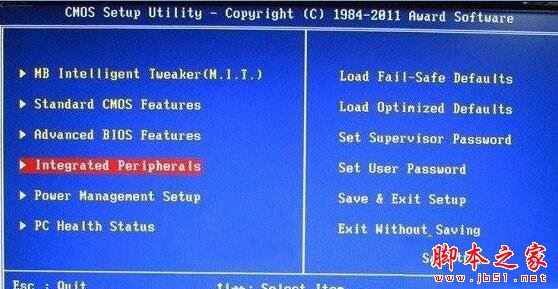
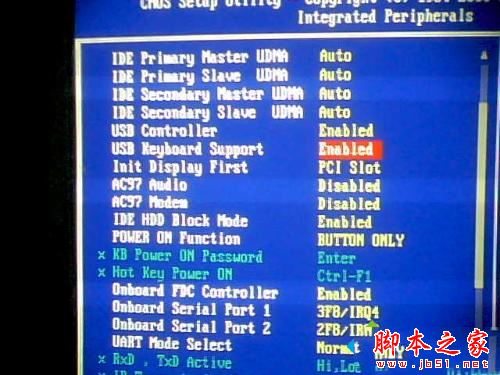
Win7 開機狂按 Delete 進不了 BIOS,主因:主板 BIOS 設定「開機階段禁用 USB 鍵盤」,需登入介面後才能用。解決:用 PS/2 圓口鍵盤進 BIOS 開啟 USB 支援。
各版本 BIOS 選單位置略有不同,請靈活尋找 USB Keyboard Support 選項。 延伸閱讀:Win10 無法進入 BIOS 三種解決方法。
WinXP 資料夾屬性找不到「安全性」分頁?關閉「簡單檔案共享」+ 確認 NTFS 格式雙重條件
Win7 安裝 USB 無線網卡完整圖文教學:讓台式機也能連 Wi-Fi
Win7 設定螢幕保護程式完整教學(含預覽與等待時間調整)
Windows Server 2003 15 招實用操作技巧:釋放空間、加快關機、優化播放、關閉安全提示、提升反應速度
微軟官方確認:Win10 Mobile 正式版升級暫限 18 款機型,無第二波計劃
微軟官方發布 Win10 藍屏死機 (BSOD) 完整修復指南 與預防建議
WPS Office 文件新增自訂版權聲明/浮水印教學:文字方塊與物件格式設定
Win10 企業版 10240 開啟預覽版接收後需等 24 小時才能收到更新