Win10 視覺特效豐富但消耗資源,調整為最佳效能可釋放系統效能:
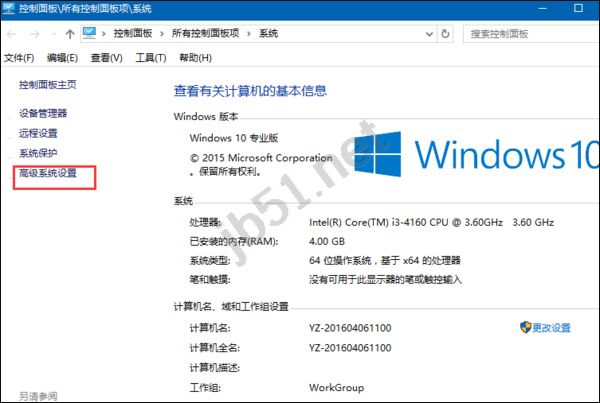
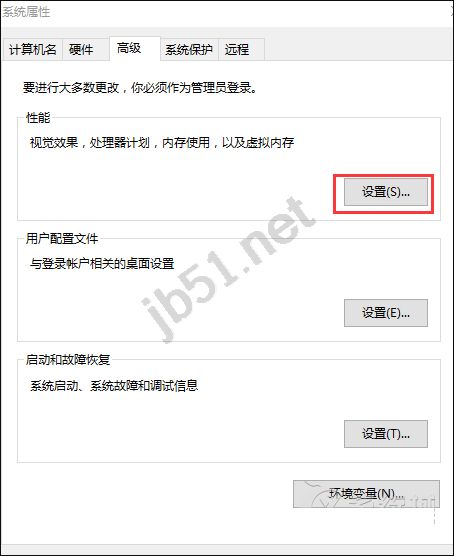
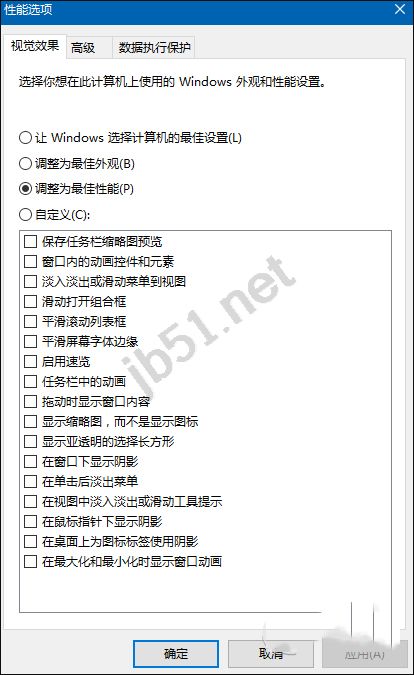
視需求在效能與外觀間平衡,老舊/低配電腦建議選「最佳效能」或精簡自訂。
Win10 Mobile RedStone 14267.1004 更新內容匯總:修復充電、語音信箱、雙卡支援、人脈歷史記錄
Win8 系統連接 VPN 失敗提示錯誤代碼 807 解決方法
Win10 Mobile 14332 預覽版上手影片評測:電池續航顯著提升、Edge 設定改版、移除訊息+Skype 整合
Win7 無線網路連不上?教你排查驅動與設定問題完整解決攻略
微軟公布 Win10 SDK Build 10586 開發工具更新詳情:Composition API、SQLite、XAML 增強