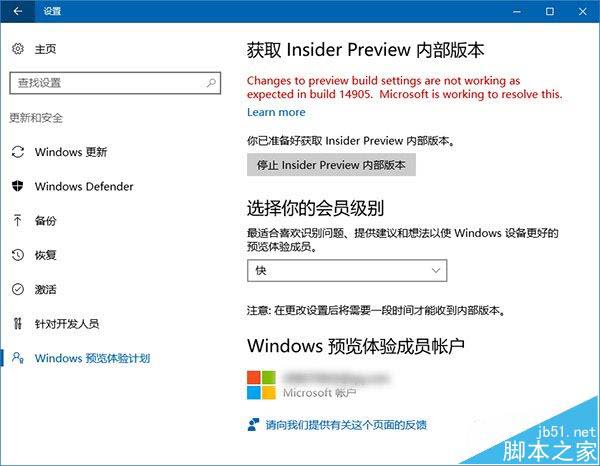
Windows 10 Redstone 2 Build 14905 升級後,「設定」→「更新與安全性」→「Windows Insider 計畫」顯示「此選項不可用」(紅字提示)。微軟社群人員 Jason 確認:此問題僅發生於 PC 端 14905,不影響 Mobile 端。微軟已找到原因並修復,後續版本將恢復正常,但不會為 14905 專門推送補丁。建議 Insider 會員等待下一版本(預估 1-2 天內推出)升級解決。
關鍵資訊整理
- 影響範圍:Windows 10 PC Build 14905(Mobile 版正常)
- 症狀:設定中 Windows Insider 計畫項目顯示不可用
- 官方回應:不影響其他系統功能,已修復於後續版本
- 補丁計畫:不會針對 14905 釋出修補程式
- 建議動作:等待下一版本推送升級(Fast Ring 推送頻率極高)
版本性質說明
- Insider 預覽版:限定 Insider 會員測試,新功能搶先體驗,伴隨各類 Bug,使用者需自行承擔風險。
- 正式版:經 Insider 測試並修復已知問題,穩定性高,適合一般使用者,新功能上線較慢。
- 週年更新版:正式版釋出一週年推出,加入多項新功能並完善既有功能,相關預覽版持續測試中。
補充提醒
- Build 14905 另有一已知問題:開始選單電源按鈕無法展開關機/重開機/睡眠選單,可右鍵開始按鈕或按 Alt + F4 繞過。
- 參與 Insider 計畫請做好資料備份,重要工作環境建議使用正式版。
微軟快速迭代修復 Insider 版本問題,耐心等待下一版本即可恢復正常內建更新通道!