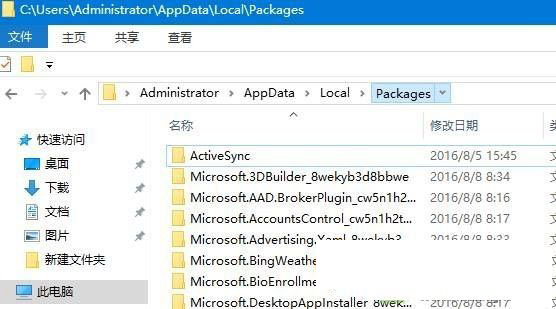
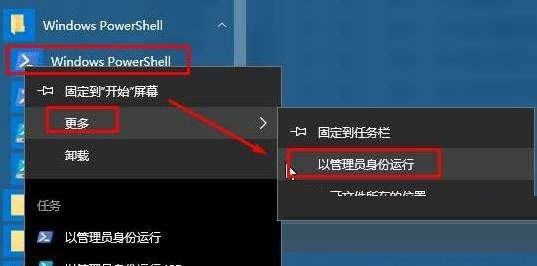
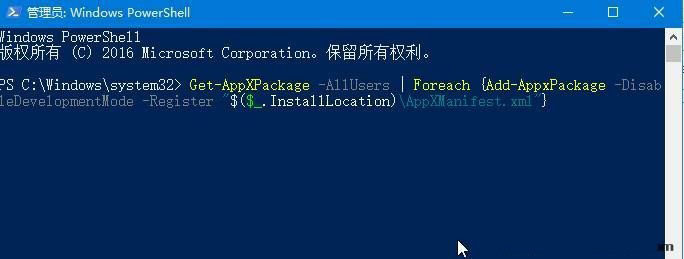
Edge 為系統級 UWP 應用,無法像傳統軟體在「應用程式與功能」解除安裝。重裝需手動刪除套件資料夾再用 PowerShell 重註冊。
%USERPROFILE%\AppData\Local\Packages → 找到 Microsoft.MicrosoftEdge_8wekyb3d8bbwe → 刪除。Get-AppXPackage -AllUsers -Name Microsoft.MicrosoftEdge | Foreach {Add-AppxPackage -DisableDevelopmentMode -Register "$($_.InstallLocation)\AppXManifest.xml" -Verbose}
Win7 如何關閉 SmartScreen 篩選器?IE 選單兩步完成,附網站安全檢查替代方案
Windows 10 標題列恢復彩色主題完整教學:複製 aero 主題資料夾重命名規避 uDWM.dll 白色強制機制
Win10 14367「將這台電腦設為可被發現」開關卡在關閉?透過本地安全性原則將網路位置改為私人網路
Win7 安裝字型超簡單:直接複製 .ttf 到 Fonts 資料夾,比 XP 更直觀
Windows 10 預覽版關閉開機密碼登入畫面:netplwiz 自動登入設定 (含安全性警示)
多重開機已裝 Win10 卻仍被推廣升級?六種關閉 Win10 推送提示方法總整理