Windows XP Windows 7 Windows 2003 Windows Vista Windows 綜合教學 Linux 系統教學
Windows 10 Windows 8 Windows 2008 Windows NT Windows Server 電腦軟體教學
您现在的位置: Windows教程網 >> Windows教程 >  >> Windows 綜合教學 >> 關於 Windows

Win7 安裝補丁提示「缺少 Service Pack 系統組件」原因與修復:還原驅動程式備份資料夾

編輯:關於 Windows

Win7 安裝 SP1 或其他更新時提示「缺少 Service Pack 系統組件」,主因為系統清理工具(如舊版優化大師)誤刪 C:\Windows\System32\DriverStore\FileRepository 下的驅動備份資料夾。修復核心在於還原被刪除的檔案。

修復步驟

  1. 下載對應系統版本(32/64 位)的驅動備份檔案並解壓。
  2. 取得 FileRepository 資料夾管理員權限:
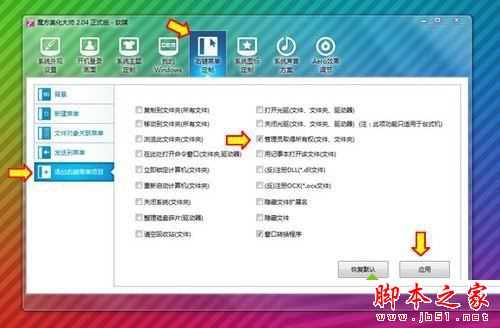
    • 使用工具(如魔方電腦大師)右鍵選單加入「管理員取得所有權」。
    • 右鍵 FileRepository → 「管理員取得所有權」 → 等待命令視窗自動關閉。
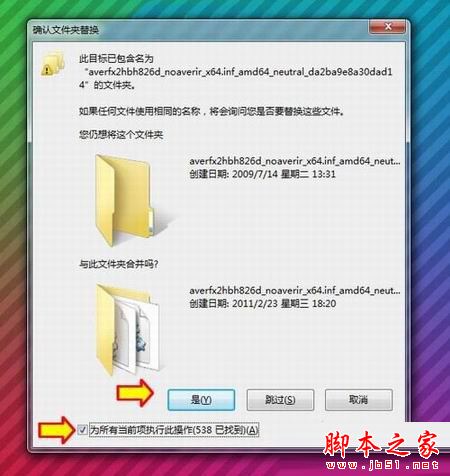
  3. 將解壓出的 FileRepository 內容複製/剪貼至 C:\Windows\System32\DriverStore\FileRepository,選擇「取代目標檔案」。
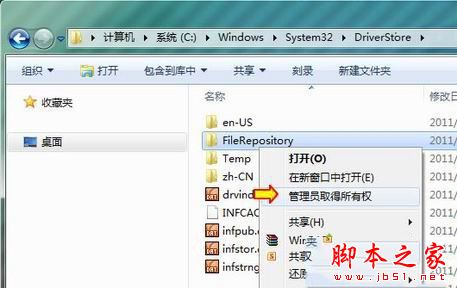
  4. 若仍提示權限不足,重新取得權限或手動在資料夾「安全性」分頁添加當前使用者「完全控制」權限後重試。
  5. 完成後即可正常安裝 SP1 或透過 Windows Update 線上升級。

推薦使用新版優化工具(如魔方 6.20+),已移除會誤刪驅動備份的「系統瘦身」功能。

Copyright © Windows教程網 All Rights Reserved