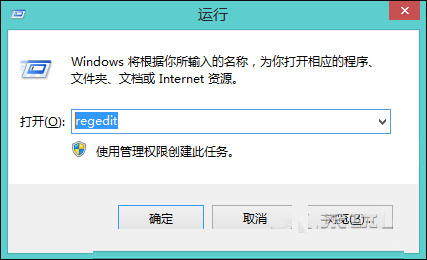
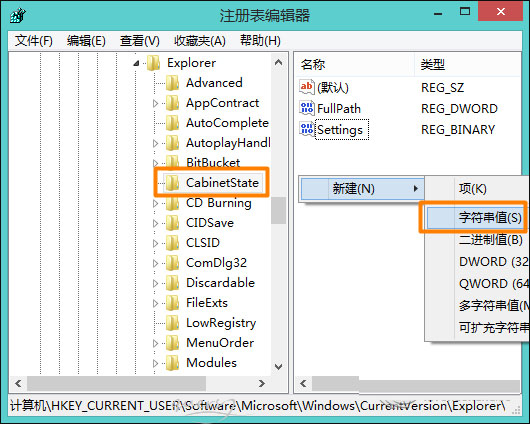
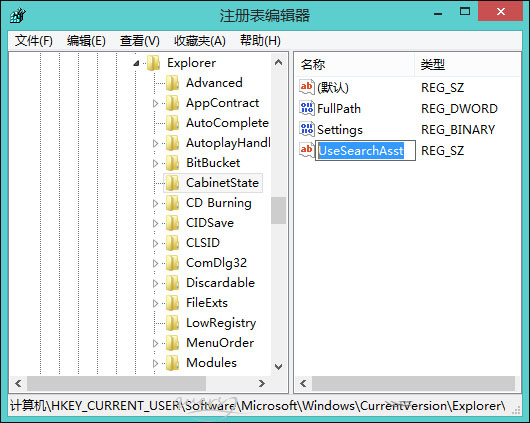
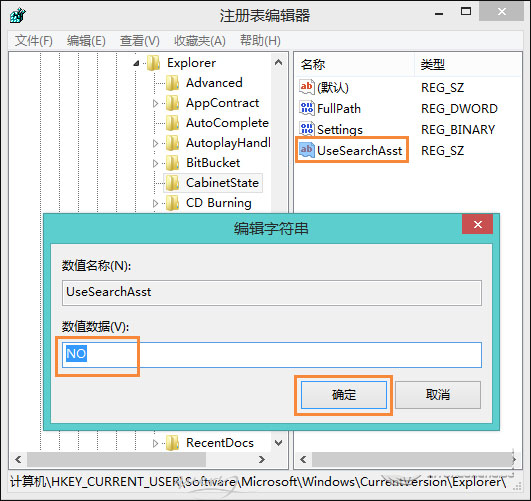
Win8.1 內建搜尋功能若無法使用,多半是第三方優化版 GHO 系統將搜尋服務停用。透過登錄表新增字串值 UseSearchAsst 並設為 NO,即可重新啟用本地搜尋。
UseSearchAsst
NO
regedit
HKEY_CURRENT_USER\Software\Microsoft\Windows\CurrentVersion\Explorer\CabinetState
預設情況下搜尋功能應正常運作,若遭精簡版系統關閉,此法可快速恢復。
Win10 內建應用安裝失敗錯誤 0x80073cff 解決方法
Win7 工作列右下角時間不見了?三步驟找回系統時鐘圖示
Windows 10 啟用隱藏通知中心(動作中心)非官方修補程式教學與風險提醒
Win10 操作中心完整攻略:通知管理、快速動作自訂與配色調整
Win10 Mobile 10136 升級注意事項:10080 需先回滾 WP8.1、時間調整檢查更新、已知 Bug 列表
徹底關閉 Win7/8.1 升級 Win10 推送通知:移除 KB3035583 與 GWX 程式
Windows 10 接收手機來電、簡訊與 App 通知圖文教學
Windows 10 虛擬鍵盤新增英文輸入文字預測功能:類手機體驗,目前僅限搜尋場景