休眠模式雖省電但會佔用大量磁碟空間(hiberfil.sys)。若不需休眠,可用管理員命令提示字元一鍵關閉。
powercfg -h off
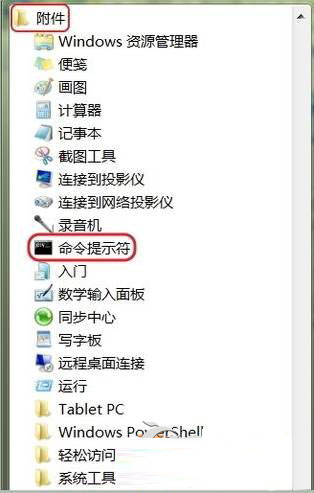
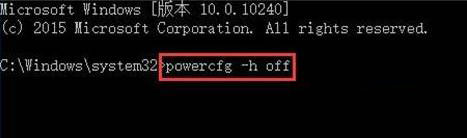
執行完成後,休眠功能即被關閉,hiberfil.sys 檔案自動刪除,釋放數 GB 磁碟空間。需恢復時執行 powercfg -h on 即可。
微軟解讀:企業如何部署與管理 Win10?Windows Hello 生物辨識成安全新標竿
Win10 設定自動登入:netplwiz 取消「使用者必須輸入使用者名稱和密碼」→ 輸入帳號密碼確認
Win10 C 槽 inetpub 資料夾刪不掉?關閉 IIS 功能即可輕鬆移除
Windows 7 超實用 50 項功能與技巧大全 (第 1-20 項):電腦守衛、螢幕校準、AppLocker、ISO 燒錄、視窗靠邊、快速啟動欄等
Win7 ADSL 撥號錯誤 711 徹底解決:批次檔 + 群組原則設定開機自動修復