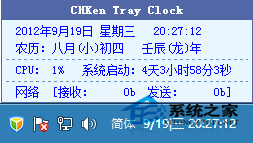
Windows 8 預設任務列時鐘功能單薄,僅顯示時間與日期。若想查看農曆、星期、CPU 使用率、系統啟動時間、甚至控制光碟機、啟動工作管理器、設定定時執行程式,皆須借助第三方工具。CHKen Tray Clock 正是這類輕量級增強神器,安裝後直接整合於任務列通知區域,功能豐富且不佔資源。
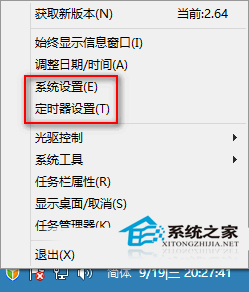
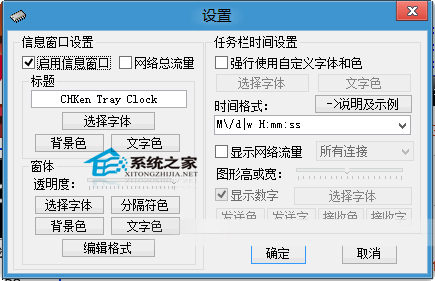
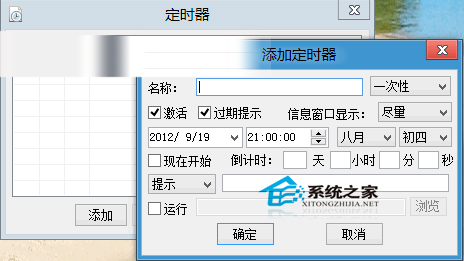
適合需常監控系統資源、習慣定時自動化任務、或偏好傳統桌面操作的 Windows 8/8.1 用戶。工具體積小巧、免安裝綠色版,下載即用。
Win8 升級 Win8.1 後播放器綠畫面?顯卡設定「預設配置」修復
微軟 Windows 10 正式版後續更新代號「紅石」,預計 2016 年推出
Win8.1 通知區圖標開關變灰無法設定?修改登錄表即可恢復
Win10 「動作中心」更名為「安全性與維護」:功能不變僅改名稱
Win10 正式版螢幕保護程式設定教學:個人化 → 鎖定畫面 → 螢幕保護程式設定
Win10 升級資料夾 $Windows.~BT 是什麼?位置在哪?升級後如何安全刪除釋放空間
PC 版 Windows 10 硬體需求公布:32位 1GB RAM/16GB 硬碟、64位 2GB/20GB、DX9 顯卡、800×600 解析度