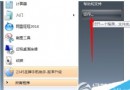
Windows 7 的區域網路共享預設啟用密碼保護,雖安全卻降低存取效率。若在受信任的區域網路環境,可依下列步驟關閉帳號密碼驗證,提升檔案傳輸速度。
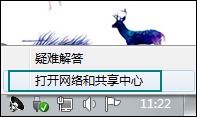
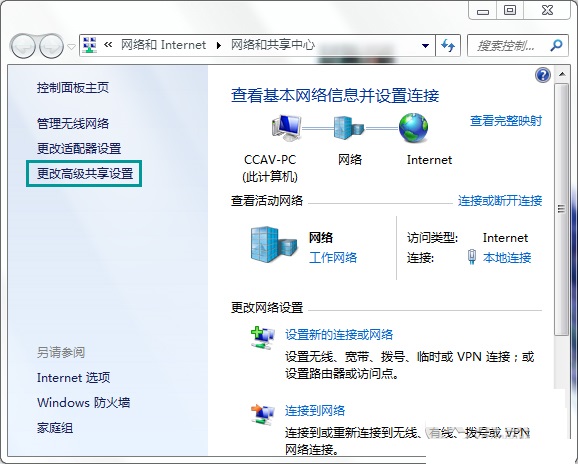
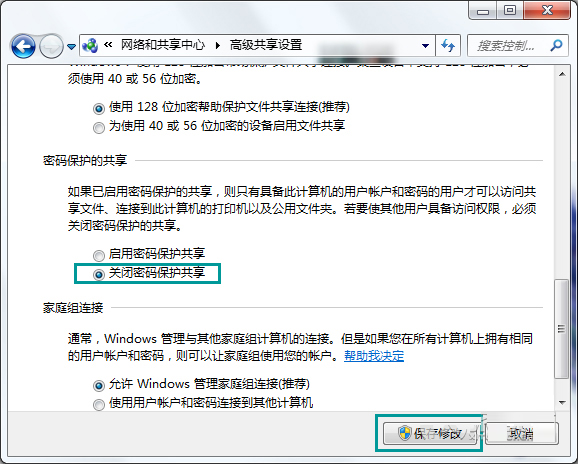
完成後,區域網路內的裝置即可無需帳號密碼直接存取共用資源。建議僅在安全的私有網路環境下啟用此設定。
沒收到 Win10 TH2 更新?原因分析與解決方案(含 31 天限制說明)
Win10 小娜 Cortana 啟用完整教學:從啟動、同意隱私到設定暱稱與微軟帳號綁定
Win7 玩《英雄聯盟》自動更新錯誤代碼 280?四大原因與對應解法:手動下載補丁、清理 Patch 暫存、關閉衝突軟體、重裝客戶端
Win10 補丁 KB3119142 反覆安裝失敗?官方提供兩種手動修復方案 (VC++ 2012 Redistributable)
Win10 跨語言版本升級安裝?修改登錄 InstallLanguage 強制繞過語言限制
Win10 無法存取 XP 共享印表機?兩大解決方案 (啟用 NetBIOS / 本機印表機安裝法)