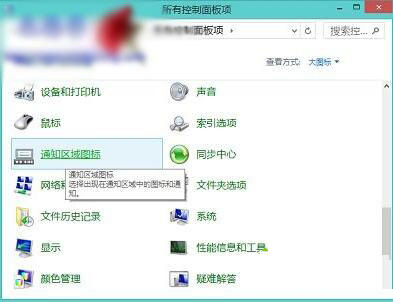
Intel RST 圖示消失恢復:控制台 → 通知區域圖示 → 找 IAStorIcon → 下拉選單選「顯示圖示與通知」或「僅顯示通知」。若列表無此項,請至主機板/品牌官網下載最新 Intel 快速儲存技術驅動重裝。
IAStorIcon
解決 Windows 8 開機自動彈出「程式庫」資料夾:登錄檔關閉自動執行
Windows 10 設定專用與公用網路的完整圖文教學
Win10 版本太多用戶挑花眼?媒體呼喚單一版本策略,微軟回應:針對不同市場細分
Win10 查詢 IP 位址兩大法:設定介面視覺化與 CMD 指令快速查
Win10 Build 10108 新功能示範影片:UI 細節打磨進入倒數階段
Win10 邮件应用如何更换背景图片?设置 → 个性化 → 浏览选图一键完成
Windows 7 磁碟清理工具完整使用教學:掃描清除系統垃圾、臨時檔案、縮圖快取、錯誤報告
Windows Server 2008 修改伺服器名稱與管理員密碼完整教學