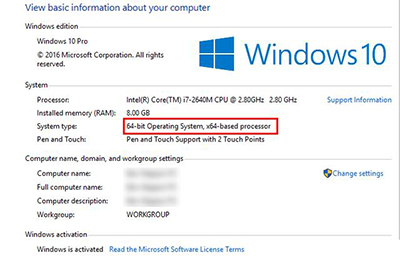
32 位與 64 位差異源於 CPU 架構:32 位位址空間 2^32(4 GB),64 位 2^64(18 EB)。關鍵差異:1) 記憶體上限:32 位系統最多識別 4 GB RAM,64 位無實際上限。2) Program Files 資料夾:32 位單一 Program Files;64 位雙資料夾 Program Files (64 位) + Program Files (x86) (32 位)。3) 相容性:32 位支援 16 位舊程式;64 位不支援 16 位,但支援 32 位 (WoW64)。查看版本:右鍵「這台電腦」→ 內容 → 系統類型。升級:64 位 CPU 跑 32 位系統可重裝升級 64 位;32 位 CPU 無法升級。現今 64 位為主流標準,開發者專注 64 位軟體。
Chrome x64 版利用 64 位架構增強安全性與穩定性,雖速度不一定顯著提升。選擇系統版本請依 CPU 支援度與記憶體需求決定。