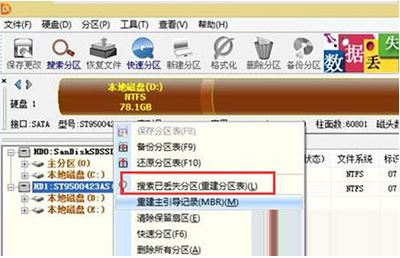
解決 invalid partition table 錯誤步驟
下載 DiskGenius 並整合至開機光碟/USB。
Windows 8 複製檔案新體驗:單一進度視窗與暫停/續傳功能詳解
Win10 如何關閉使用者帳戶控制 (UAC)?取消彈出提示完整教學
Win7 連接小米藍牙耳機提示「週邊裝置安裝失敗」?裝 Atheros 驅動搞定
Win7 一鍵開啟「網路連線」設定:ncpa.cpl 指令完整教學
百度將取代 Bing 成中國版 Windows 10 預設搜尋引擎:Edge/IE/系統級搜尋全面切換,微軟妥協換市場
Windows 7 忘記開機密碼破解:PE 系統啟動碟修改密碼
Win7 Home Basic 家用初階版如何顯示「我的電腦」「回收站」等桌面圖示
Win8 如何將常用應用程式釘選到搜尋列最上方?快速存取技巧