安裝 Chrome/Firefox 等第三方瀏覽器後,IE 每次啟動都彈出「Internet Explorer 目前不是預設瀏覽器,要設為預設嗎?」。透過 Internet 選項即可永久關閉此提示。
操作步驟
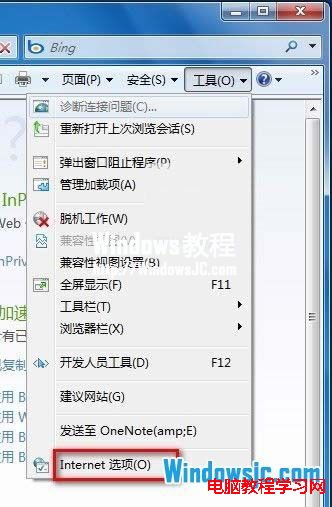
1. 開啟 IE → 右上角齒輪圖示「工具」 → 「Internet 選項」。
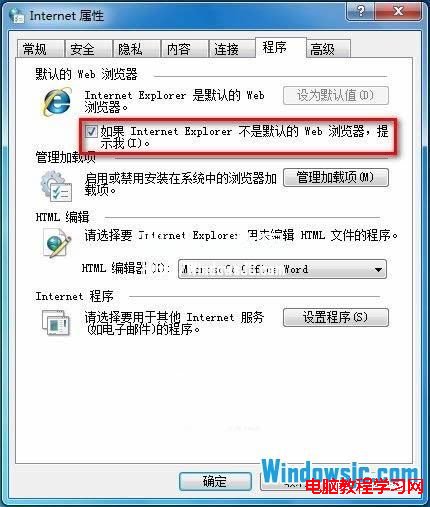
2. 切換「程式」索引標籤。
3. 取消勾選 「如果 Internet Explorer 不是預設的 Web 瀏覽器,提示我」。
4. 按「確定」生效,下次啟動 IE 不再彈出提示。
補充說明
- 若未來想改回 IE 為預設,同位置勾選並按「設定程式」→「將 Internet Explorer 設為預設程式」。
- Windows 8/10/11 預設瀏覽器管理移至「設定」→「應用程式」→「預設應用程式」,IE 此選項已移除(IE 進入維護模式)。
- 企業部署:群組原則
使用者設定 → 系統管理範本 → Windows 元件 → Internet Explorer → 關閉預設瀏覽器檢查。