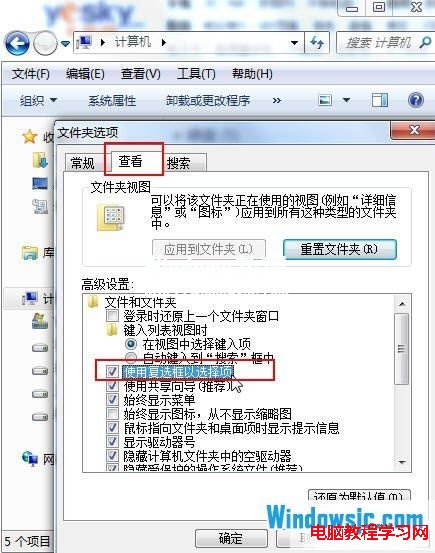
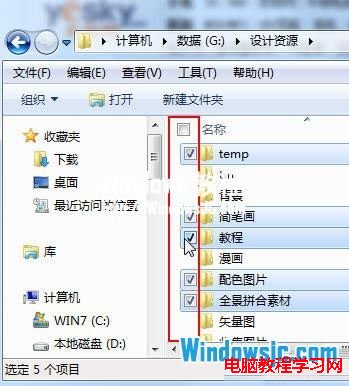
在資料夾中需選取多個不連續檔案,按住 Ctrl 點選容易誤觸?Windows 7 內建「使用核取方塊選取項目」功能,啟用後每個檔案前顯示核取方塊,滑鼠單擊即可多選,操作更直覺。
啟用後,將滑鼠移至檔案名稱左側即出現核取方塊,點選即可勾選,再配合複製/移動/刪除,大幅提升整理效率。
Win10 升級後 C 槽出現 Windows.old 資料夾?能不能刪?官方正確清理教學
Win8 舊軟體相容性問題:內建「相容性疑難排解」一鍵修復
Win7 徹底關閉離線檔案服務,釋放記憶體加速系統 (適用小記憶體電腦)
Win10 Insider Preview 如何從慢速通道切換至快速通道?圖文教學
Windows 7 刪除不需字型釋放磁碟空間:字型資料夾管理與備份技巧
Win10 應用程式商店《極限競速 6》下載後無法執行?C 槽空間、64 位元、驅動程式三檢查
Windows 7 32 位系統磁碟代號錯亂完美解決方案:重新安裝並選擇「全新安裝」
註冊表隱藏 USB 磁碟機代號:NoDrives/NoViewOnDrive 雙重封鎖防資料外洩