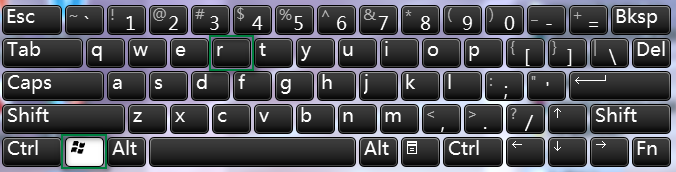
低規格電腦開啟工作列預覽延遲明顯。透過登錄新增 ThumbnailLivePreviewHoverTime DWORD 值(毫秒單位,建議 200-300)可縮短預覽觸發時間,大幅提升回應速度,保留預覽功能兼顧效能。
regedit 定位:HKEY_CURRENT_USER\Software\Microsoft\Windows\CurrentVersion\Explorer\AdvancedThumbnailLivePreviewHoverTime。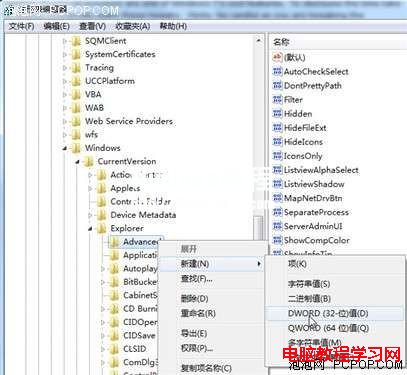
200、300),視個人習慣調整。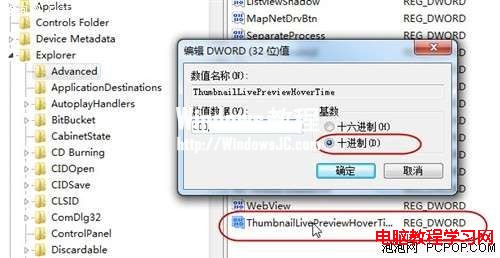
此技巧讓預覽功能在低階硬體上也能流暢運作。
Win10 應用商店提示「裝置數量達上限」怎麼解?微軟帳號裝置管理移除舊裝置教學
Win10 360 安全衛士錯誤碼 80060004 無法開啟?系統急救箱深度查殺教學
Win10 任務欄時間顯示星期幾?自定義日期格式添加 dddd 參數
Windows Server 2008 禁用本地連接埠雙法:Windows 防火牆新增阻擋規則 vs IPsec 原則深度防禦
Windows 10 應用程式商店/應用閃退修復:PowerShell 重新註冊與代理設定檢查
新電腦裝 Win10 還是 Win7?綜合優缺點分析與購機建議
Windows RT 能升級 Windows 10 嗎?Surface RT/2 可獲部分功能更新
Win10 小娜打不開提示「依公司原則停用 Cortana」?群組原則啟用「允許使用 Cortana」並檢查檔案總管搜尋設定解決