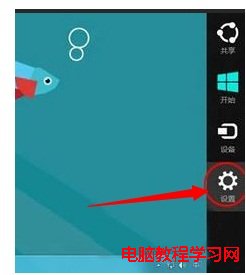
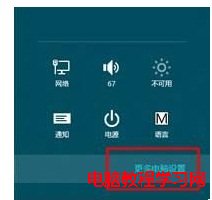
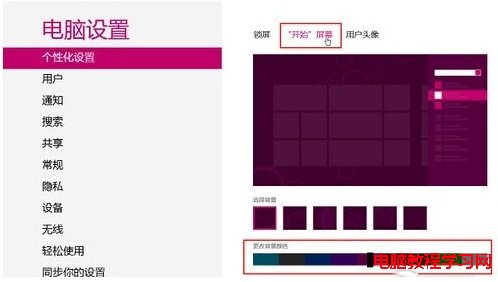
Win8 Metro 開始畫面背景顏色/紋理可自訂:
目前不支援自訂顏色碼,但顏色+紋理組合已能讓開始畫面煥然一新,期待未來開放自訂。
Windows 10 家庭組密碼怎麼查看?圖文教學輕鬆找回與修改密碼
Windows 7 32位元 IE 快取路徑查看與修改教學:定期清理加速瀏覽
升級 Win10 後有線網卡無法使用?刪除舊驅動檔案 + 重裝廠商官方驅動徹底解決
Win7 64位系統提示缺少 wpcap.dll 的三種修復方案
Win10 升級後 Windows Defender 無法啟動:清除 MSE 殘留、恢復 Defender 服務雙步驟修復
重裝 Win7 遇到黑畫面?常見 6 大原因與對應解決方案
U 盤安裝 Win10 周年更新正式版完整圖文教程:軟媒魔方製作啟動盤、BIOS 設定、分區安裝全流程
Win8 刪除內建英文輸入法:語言偏好設定移除「美式鍵盤」一步到位