IE 瀏覽器長期使用會累積大量快取檔案,影響效能。Win7 32位元系統可透過 IE 選項快速查看與變更快取資料夾位置。
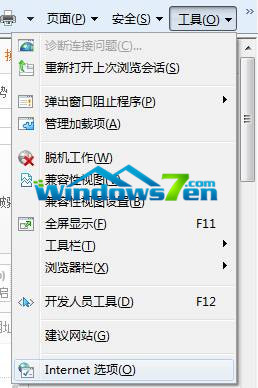
圖 1:工具 → 網際網路選項
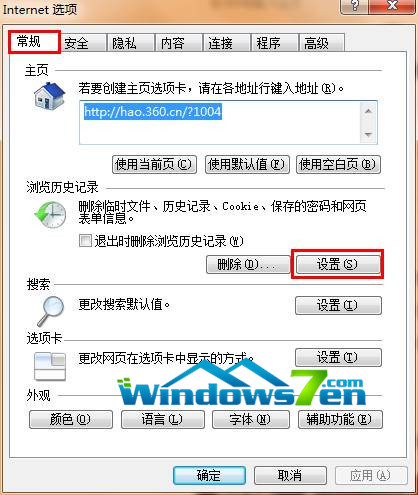
圖 2:一般索引標籤
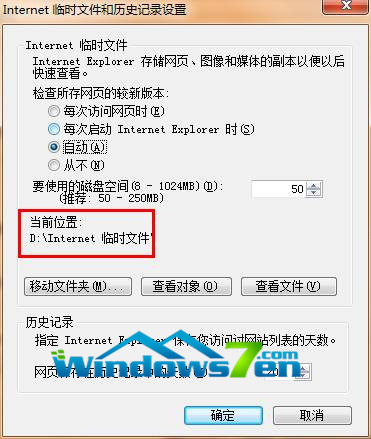
圖 3:快取檔案目前位置
定期清理或移動快取路徑至非系統盤,能有效釋放 C 槽空間、提升瀏覽速度。
Win8.1 從 Microsoft 帳戶切換為本機帳戶登入完整教學
Win10 预览版新配音 Eva 解锁注册表法:导入 MSTTS_V110_enUS_EvaM 语音令牌,文本转语音下拉菜单即可选择
Win10 TH2 企業版群組原則「延遲升級與更新」:升級可延 8 個月、更新可延數週、可完全暫停
Win10 更新 KB3074681 導致檔案總管崩潰 臨時解決方案
Windows Server 2016 Technical Preview 3 Build 10514 下周推送,桌面版 Windows 10 TH2 Insider 建置版有望同步釋出