Windows XP Windows 7 Windows 2003 Windows Vista Windows 綜合教學 Linux 系統教學
Windows 10 Windows 8 Windows 2008 Windows NT Windows Server 電腦軟體教學
您现在的位置: Windows教程網 >> Windows教程 >  >> Windows 綜合教學 >> 關於 Windows

Windows 8 限制磁碟機存取:群組原則「防止從我的電腦存取磁碟機」設定

編輯:關於 Windows

重要資料怕被偷看?隱藏檔案不保險,用群組原則限制磁碟機存取:

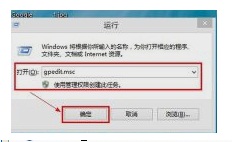
  1. Win+R → gpedit.msc 開啟群組原則編輯器。
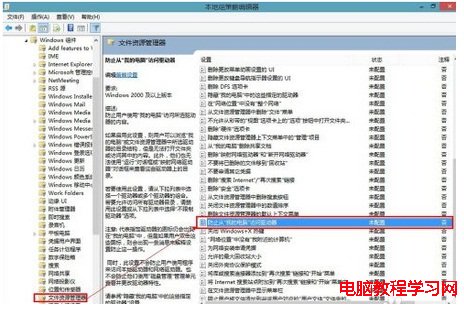
  2. 使用者設定 → 系統管理範本 → Windows 元件 → 檔案總管 → 「防止從『我的電腦』存取磁碟機」。
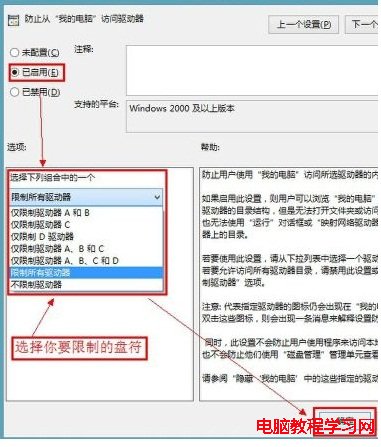
  3. 雙擊 → 「已啟用」 → 選擇要限制的磁碟機 (如僅限 D:) → 確定。
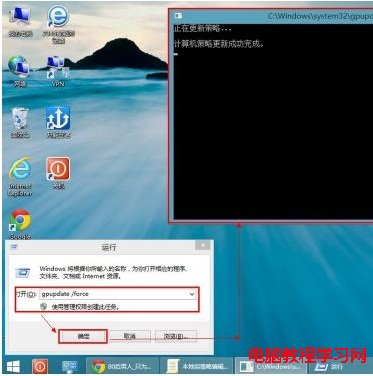
  4. Win+R → gpupdate /force 強制重新整理原則。
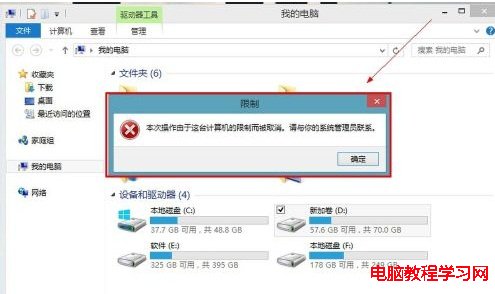
  5. 驗證:點擊被限制磁碟機 → 提示「此作業已被取消」。

啟用後仍可瀏覽目錄結構,但無法開啟資料夾/存取內容,比隱藏檔案更安全。

Copyright © Windows教程網 All Rights Reserved