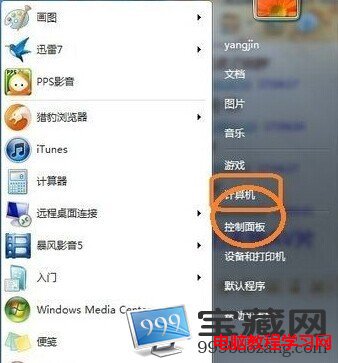
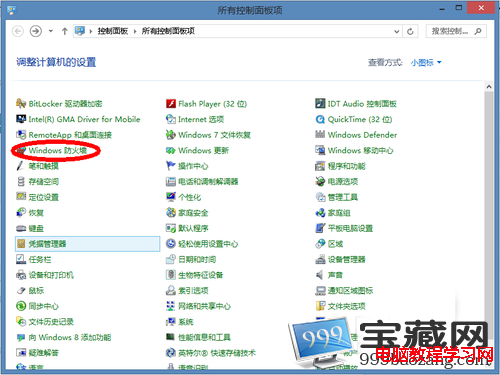
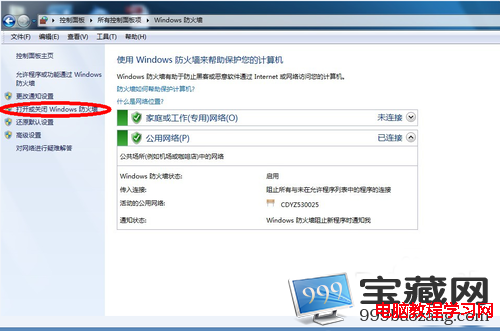
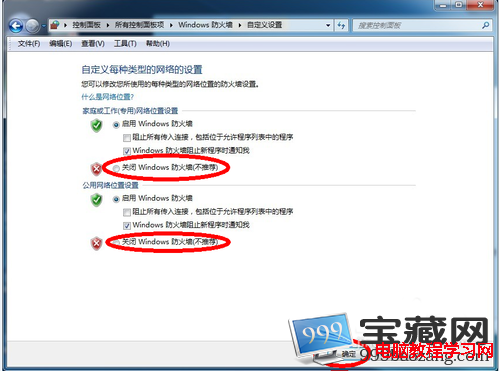
Windows 7 防火牆可透過控制台暫時關閉(不建議長期關閉),適用於排除網路連線問題、特定軟體相容測試等情境。
警告:關閉防火牆將使電腦直接暴露於網路攻擊、病毒、木馬威脅。僅在必要時短暫關閉,測試完成後立即重新開啟。長期防護建議改用具備防火牆功能的完整安全套裝軟體。
開機出現 STARTING ONTRACK 藍框?DM 軟體寫入 MBR 導致,清除 DDO 即可解決
Windows 10 夏季發布:盜版也能免費升級,騰訊/360/聯想/小米四大管道全解析
Win7 關機超慢?一招加速關機流程
Win7 無法修改系統時間?三大成因(電池、權限、病毒)與排查流程
Windows 8 解除 Modern 應用程式網路隔離限制(CheckNetIsolation 指令)
Windows 7 右鍵選單響應緩慢?清理 ContextMenuHandlers 登錄項加速
Win7 工作列鍵盤/輸入法圖示不見了怎麼找回?語言列設定「停駐於工作列」或輸入法內建選單恢復
若 Windows 8 免費升級,你會安裝嗎?回顧微軟定價策略失誤