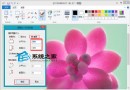
Win7 家庭群組建立時會自動產生一組複雜密碼,若想改為好記的自訂密碼,操作非常簡單:
之後其他電腦欲加入該家庭群組,皆需輸入新密碼才能存取共用圖書館、印表機等資源。
Win10 版本太多用戶挑花眼?媒體呼喚單一版本策略,微軟回應:針對不同市場細分
Win7 看影片黑畫面有聲音?清理快取、更新 Flash/顯卡驅動/IE 逐項排查解決
新手救星:聯想發布 PDF 版 Win10 使用指南
Win7/Win8.1 升級 Win10 後 Office 2013 文件無法開啟:修復安裝或執行 icacls 指令
Win10 會員收不到預覽版推送?UAC 設定過高導致,調整為第二級即可修復
Win7 使用印表機掃描文件:「裝置與印表機」右鍵開始掃描,儲存為影像檔
Win8.1 選 32 位還是 64 位?核心差異、記憶體支援、效能對比、選購建議完整分析
Windows 7 燒錄光碟讀不到光碟機「請插入光碟」 重裝光碟機驅動程式解決