Windows XP Windows 7 Windows 2003 Windows Vista Windows 綜合教學 Linux 系統教學
Windows 10 Windows 8 Windows 2008 Windows NT Windows Server 電腦軟體教學
您现在的位置: Windows教程網 >> Windows教程 >  >> Windows 綜合教學 >> 關於 Windows

修復 Windows 8 無法連線 System Event Notification Service 服務錯誤

編輯:關於 Windows

System Event Notification Service (SENS) 服務異常會導致網路無法連線、開機極慢,常因過度優化系統(如停用關鍵服務)引起。本文提供透過安全模式執行 netsh winsock reset catalog 重設 Winsock 目錄的標準修復流程,快速恢復網路與開機速度。

操作步驟

  1. 進入安全模式:Win+R 輸入 msconfig → 「開機」頁籤 → 勾選「安全開機」→ 「最小」 → 確定重開機。
  2. msconfig 安全開機設定
  3. 安全模式下,Win+R 輸入 cmd 開啟命令提示字元。
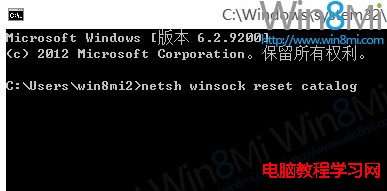
  4. 輸入指令:netsh winsock reset catalog → 按 Enter。
  5. 命令提示字元執行指令
  6. 重新開機回到正常模式,網路與開機速度應恢復正常。
  7. 重開機完成

原理說明

netsh winsock reset 會將 Winsock 目錄重設為乾淨狀態,修復因服務優化導致的網路協定堆疊損毀,同時恢復 SENS 服務相依的網路事件通知功能。

Copyright © Windows教程網 All Rights Reserved