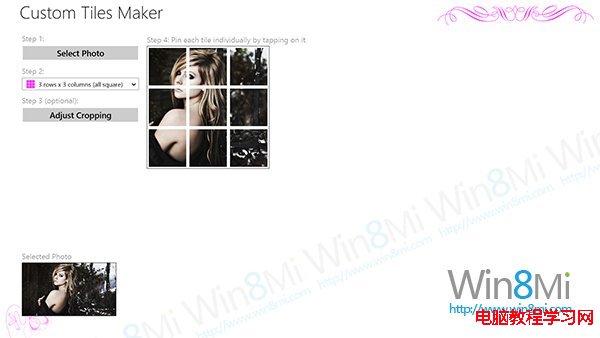
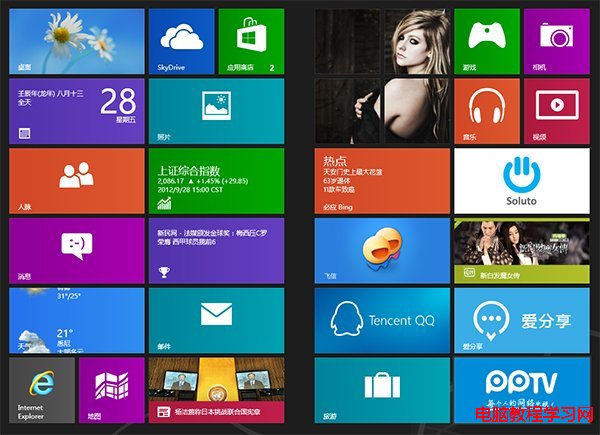
Windows 8 Modern 介面預設磚佈局單調,若想加入個人化圖片牆,可透過 Windows Store 免費應用「Custom Tiles Make」實現。本文教您安裝應用、選擇相片、自訂磚尺寸、裁切後釘選到開始畫面,打造獨一無二的圖片牆磚群,美化 Modern 介面視覺體驗。
開始畫面將呈現由多個磚組成的拼貼圖片牆,點選任一磚可啟動應用或開啟對應連結,極具個人風格。
Win10 新設定 PIN 碼無法登入/刪除/修改?預覽版 Bug,可輔助 Win8.1 管理
Windows 7 服務優化完整指南:逐項分析啟動類型建議
Win8/8.1原生挂载ISO:无需虚拟光驱软件直接打开镜像
Windows 10 上市不到兩週推出第三款累積更新 KB3081438,體現「Windows即服務」策略
Win 10 降級 Win 7/8.1 教程:系統回退功能安全方便,一個月內有效
Win7 系統右下角小白旗「解決電腦問題」怎麼關閉?完整移除教學
Win7 開機顯示「press any key to restart」無法進入系統?五大修復步驟排查硬碟故障
微軟官方闡述 Win10 首年免費升級細節:授權終身有效、企業版不免費、預覽版用戶需購買