安裝 Windows Phone 8.1 SDK 需啟用 Hyper-V,而 Hyper-V 要求 CPU 支援 SLAT(Second Level Address Translation,二級位址轉換)。若 CPU 不支援,即使安裝成功也無法運行模擬器。可用 Microsoft 官方工具 Coreinfo 快速檢測。
Coreinfo.exe 並置於任意磁碟根目錄(如 D:\)。D: 按 Enter),執行命令:Coreinfo.exe -v
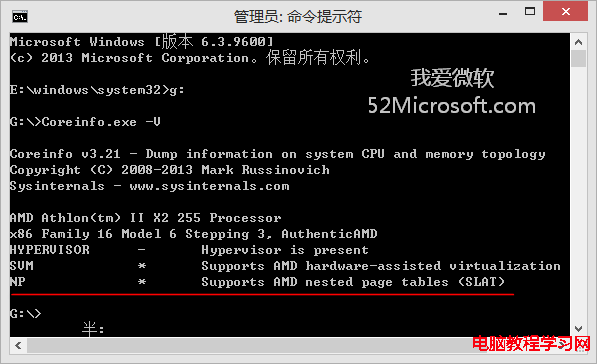
* 表示 支援;- 表示 不支援。直接雙擊執行會視窗一閃而過,無法看結果。必須在管理員命令提示字元中執行 並加參數 -v(虛擬化相關旗標)。
確認支援 SLAT 後,可著手安裝 Windows Phone 8.1 SDK 並啟用 Hyper-V 進行模擬器開發。
Win10 企業版 10240 (1507) 將於 3 月 26 日停止補丁更新:企業用戶 60 天過渡期升級新版本
解決 Win8.1 更新錯誤 80073712:確認更新服務啟動、重命名 SoftwareDistribution、DISM 修復元件存放區
Win10 14965+ 版本註冊表編輯器地址欄快速定位鍵值的高效技巧
重裝 Windows 7 提示「Windows 無法完成安裝」解決方案
Win10 內建「步驟記錄器」完整教學:一鍵產生帶截圖的操作文件
Win7 64位 QQ 自動登出且提示「已登入無法重複登入」?任務管理器結殘留進程即可