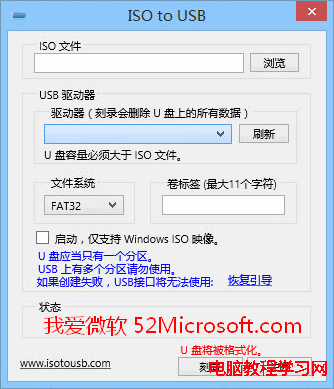
ISO to USB 是輕量級開機碟製作工具,介面極簡單,支援 Windows ISO、WinPE ISO 製作 USB 開機碟,適合不想用命令列的使用者。
替代工具:官方 Windows 7 USB/DVD Download Tool、Rufus (功能最強、支援 UEFI/GPT/NTFS/FAT32/持久化)、Ventoy (多 ISO 共存、免格式化拖放即用)。
Windows 7 讓工作列圖示置中顯示:建立空白工具列技巧
Windows 7 任務列秒顯「星期幾」:三步驟自訂日期格式
Win10 TH2 10586.63 累積更新:修補 5 項核心安全漏洞含內核提權、遠端執行代碼
Win10 Build 10576 升級後已知問題完整彙總:音量降低、訊息應用遺失聯絡人、Surface Pro 3 睡眠異常等
Win7 IE 變更預設搜尋提供者:管理搜尋引擎、新增自訂搜尋、設為預設
Windows 10 新功能全體驗評測:安裝、開始選單、視窗化 App、虛擬桌面、智慧分割
Win7 解決「Windows 無法在此電腦上設定家用群組」雙重修復法
Windows 8.1 滑鼠靈敏度與指標外觀調整教學