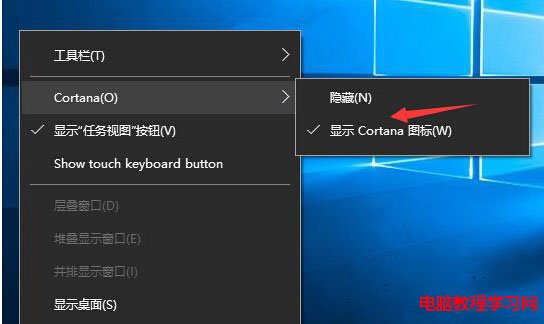
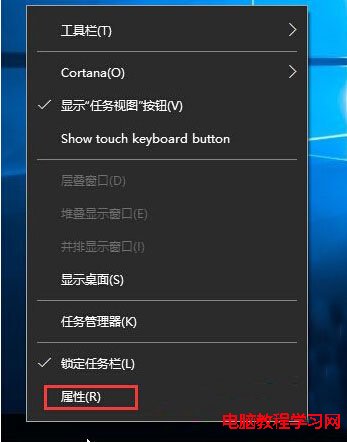
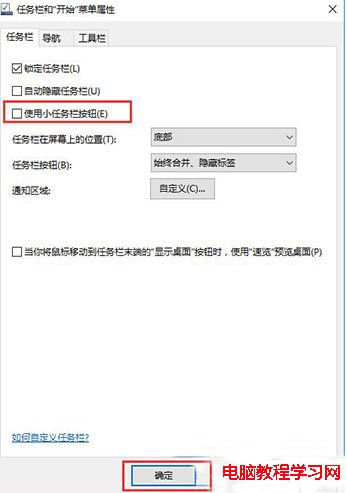
Windows 10 工作列預設會顯示搜尋方塊(Cortana),但若誤開啟「使用小工作列按鈕」,搜尋方塊會縮成圖示甚至消失。解決方式只需關閉該選項。
補充說明:新版 Win10 介面中,路徑為「設定」→「個人化」→「工作列」→「使用小工作列按鈕」。關閉後,工作列高度恢復標準大小,搜尋方塊、Cortana 圖示、工作檢視按鈕等皆會完整顯示。
Win10 應用商店閃退/無法開啟?DISM 掃描修復或 PowerShell 重裝兩大招
Win7旗艦版關閉默認管理共享(C$、ADMIN$等)的四種方法
WinXP 無法安裝 .NET Framework 解決法:停止 WuAuServ、重命名 SoftwareDistribution、註冊表權限全控
Windows 8 設定系統保護與還原點空間完整教學
Windows 10 AutoCAD 閃退解決方法:刪除 FLEXnet 授權快取檔、以管理員身分重新註冊
Windows 10 關閉自動更新利器:Win Updates Disabler 使用教學
Win7 64位系統僅搜狗瀏覽器能上網?防火牆報錯原因與完整解決方案
升级 Win10 后真实体验如何?网友热评:颜值高、发热大、兼容性待优化