Windows 7 內建多種截圖方式,無需安裝第三方軟體即可滿足大部分需求。以下整理三種主流方法與快捷鍵設定技巧。
1. 全螢幕截圖:PrtSc (Print Screen)
- 按下 PrtSc 鍵,將整個螢幕畫面複製到剪貼簿。
- 需貼上至繪圖工具(如小畫家、Word)才能存成圖檔。
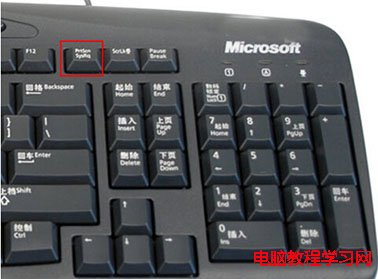
2. 作用中視窗截圖:Alt + PrtSc
- 點選欲截取的視窗使其成為焦點,按下 Alt + PrtSc。
- 僅複製該視窗畫面到剪貼簿,同樣需貼上才能存檔。
3. 內建「截圖工具」並自訂熱鍵(推薦)
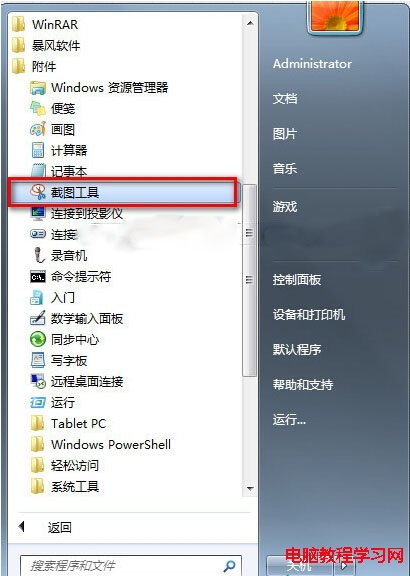
- 「開始」→「所有程式」→「配件」→「截圖工具」。
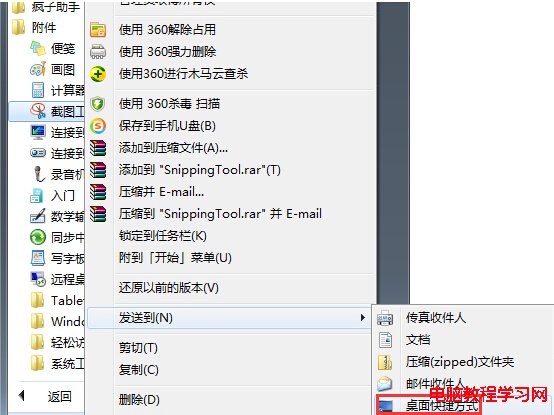
- 右鍵點選「截圖工具」→「傳送到」→「桌面捷徑」。
- 右鍵桌面捷徑→「內容」→「捷徑」頁籤→「快速鍵」欄位,按下想設定的組合鍵(如 Ctrl + Alt + S),確定。
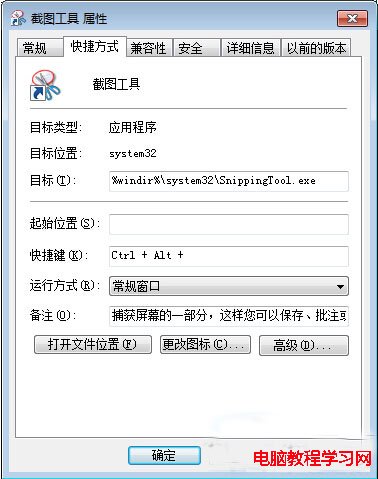
設定完成後,隨時按下自訂熱鍵即可喚出截圖工具,支援矩形、自由形狀、視窗、全螢幕四種模式,並可直接標註、儲存、寄送,比 Print Screen 方便許多。