Windows 10 開始功能表為 UWP 應用,最多支援 512 個捷徑,超過即崩潰。可透過 PowerShell 查詢現有捷徑數:Get-StartApps | measure(Count 為總數)。
常用設定調整
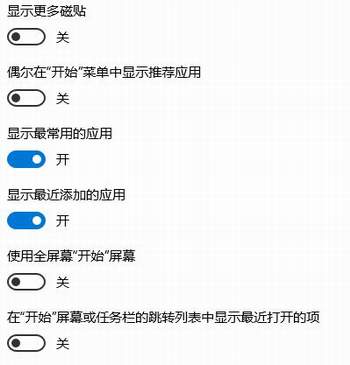
- 關閉「開始功能表/工作列跳躍清單顯示最近開啟的項目」:設定 → 個人化 → 開始 → 關閉。避免播放軟體、文件歷史記錄洩露隱私。
- 關閉「偶爾在『開始』功能表中顯示建議」:同頁面關閉廣告推薦,避免誤觸安裝推廣應用。
- 調整磚大小/固定/取消固定:右鍵磚 → 調整大小/固定到開始畫面/取消固定。
- 選擇資料夾顯示於開始功能表:同頁面「選擇出現在『開始』上的資料夾」開啟設定、檔案總管、文件、圖片等常用位置。
善用設定頁面打造乾淨高效的開始功能表,避免廣告干擾與隱私洩露。