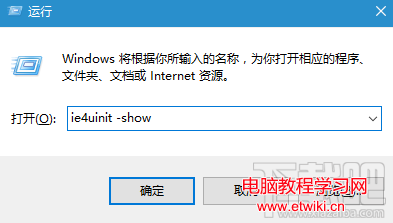
Win10/8/7 桌面圖示顯示錯誤(空白、錯位、重疊)時,無需逐一修復,只需清理圖示快取即可一鍵還原:
ie4uinit -show
此方法適用於 Win7、Win8、Win8.1、Win10 所有版本,安全無副作用,是解決圖示異常的最快捷途徑。
Win10 音量控制器從橫向改回直向?修改登錄鍵值 EnableMtcUvc=0 重啟總管即可
Win10 安裝無法建立分區?用 PE 工具將目標磁碟改為主分區
Win8.1 如何升級 Win10?透過 Windows Update 線上升級完整圖文教學
Windows 10 虛擬記憶體設定教學:自訂分頁檔大小提升系統效能
Win10 升級 10166 版出現錯誤 0X80310052 解決辦法
Win 10 聯網必須保持運行的 16 項系統服務完整清單:從 AllJoyn 路由到 WWAN 自動設定
Windows 作業系統鍵盤快捷鍵完整速查表
Win10 預覽版 14959 重置安全性原則與群組原則完整指令教學