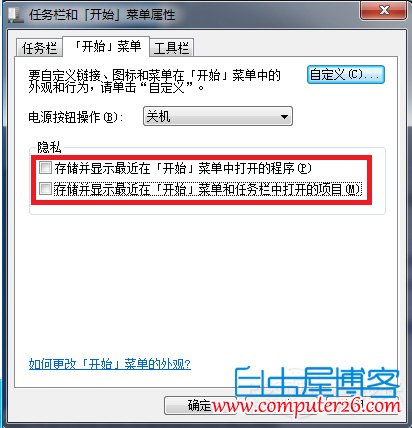
Windows 7工作列檔案總圖示右鍵選單會顯示「最近使用」清單,若不想保留可透過工作列屬性關閉。
補充技巧:若想讓檔案總管預設開啟「我的電腦」而非「程式庫」,可右鍵工作列檔案總管圖示 → 右鍵「檔案總管」 → 「內容」 → 目標欄位在%windir%\explorer.exe後加空格並輸入,(英文逗號)。
%windir%\explorer.exe
,
Win7 設定桌面背景自動輪換:建立資料夾→個人化→幻燈片播放完整教學
Windows 7 安裝 Solr 4.9 + Tomcat 8 完整圖文教學(含核心配置解析)
Win10 如何更改螢幕解析度?兩種設定入口完整教學(含驅動異常排除)
Win7 系統產生的 .old/.log/.bak/.temp 檔案能不能刪?詳細解析與清理建議
Win10 寫字板儲存為 TXT 純文字格式:兩步驟完成
Win10 如何解除安裝內建「Windows 傳真與掃描」?控制台啟用/關閉 Windows 功能即可移除
Win7 同時裝 VS 與 XAMPP 導致 80 埠衝突?登錄表修改 HTTP 服務啟動類型錯開
Windows 8.1 建立個人化主題完整教學:桌布、色彩、聲音、螢幕保護