Windows XP Windows 7 Windows 2003 Windows Vista Windows 綜合教學 Linux 系統教學
Windows 10 Windows 8 Windows 2008 Windows NT Windows Server 電腦軟體教學
您现在的位置: Windows教程網 >> Windows教程 >  >> Windows 綜合教學 >> 關於 Windows

Windows 7 Defrag 指令參數詳解:/C /H /M 並行高優先序整理所有磁碟

編輯:關於 Windows

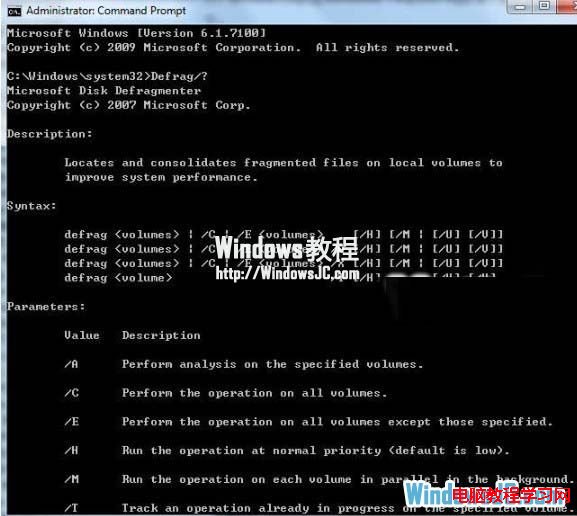
Windows 7 內建 defrag 指令支援比 Vista 更多參數,命令列模式可高效整理磁碟碎片:

常用指令組合

defrag /C /H /M

參數說明

參數功能
/C處理所有磁碟區 (All volumes)
/H以高優先序執行 (預設為低優先序)
/M平行處理多個磁碟區 (Parallel processing)
/U顯示詳細進度 (Verbose)
/V輸出詳細報告
/A僅分析不整理
/X合併磁碟區可用空間

操作示範

  1. Win+R → cmd 開啟命令提示字元。
  2. 輸入 defrag /C /H /M 按 Enter。
  3. 系統以高優先序並行整理所有磁碟區碎片。

CMD 執行 defrag 指令

指令模式適合排程自動化、遠端管理、或無 GUI 環境 (Server Core) 下的磁碟維護。

Copyright © Windows教程網 All Rights Reserved