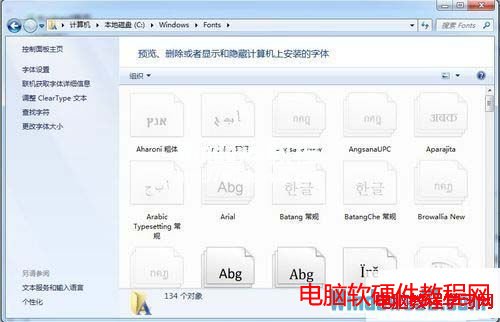
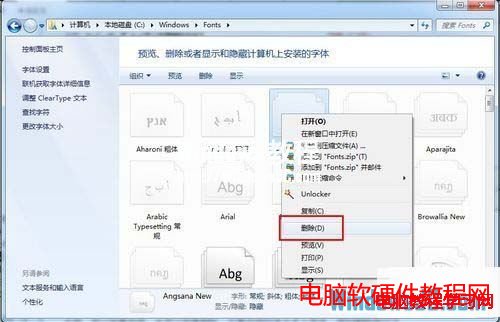
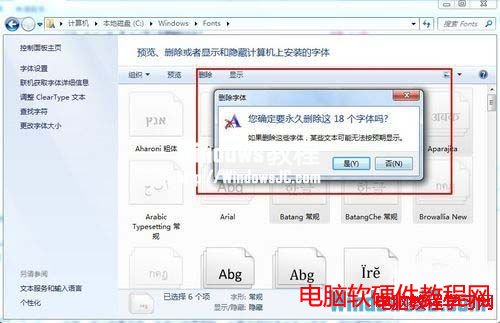
Win7 字體管理集中在 C:\Windows\Fonts,刪除字體如同刪除檔案般直覺,支援多選批量操作。
C:\Windows\Fonts
注意: 系統預設字體 (如 微軟正黑體、新細明體) 受保護無法刪除,僅能移除使用者自行安裝的字體。批量安裝同理:多選字體檔 → 右鍵「安裝」。
Windows 10 Mobile 預覽版更新內容完整彙整:新版開始畫面、通知中心、Office、Spartan 瀏覽器等詳解
XP 系統能 Ping 通卻無法上網?DNS 與 Winsock 重置修復法
Win7 通知區域圖示不顯示?用 360 人工服務一鍵修復
Win7 遠端連線印表機兩大設定法:IP 直連與記事本列印測試
Win10 如何清理 QQ 快取檔案?內建功能一鍵釋放磁碟空間
Win10 Build 9879 官方中文 ISO 鏡像下載與安裝教學 (虛擬光碟/隨身碟/硬碟安裝)
Win10 Edge 瀏覽器上手體驗評測:閱讀視圖、網頁筆記、閱讀清單、Cortana 整合、擴充功能展望
Win10 周年更新 Windows Hello 生物識別全解析:臉部/指紋/配對裝置免密登入