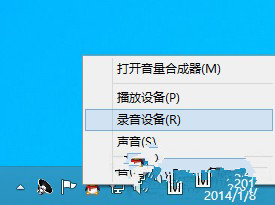
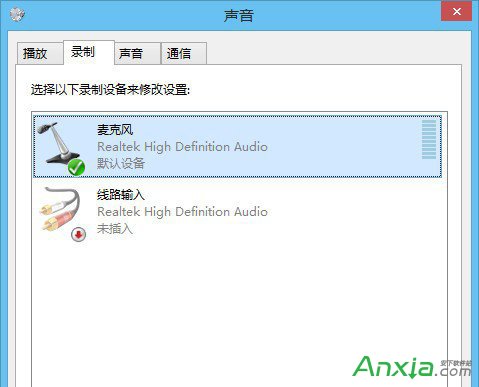
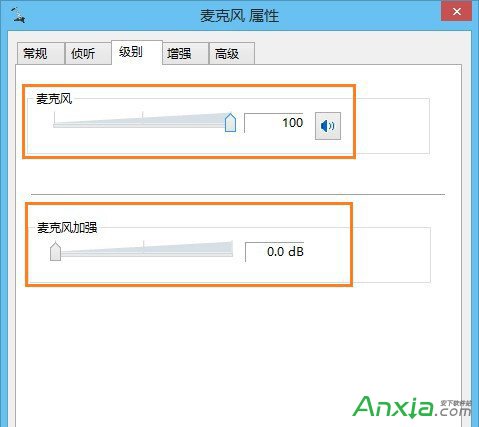
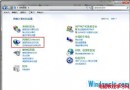
Win8 使用者常用麥克風視訊、錄音,若音量太小自己聽不出,僅錄音時才發現。以下教您調大麥克風音量。
若調整後仍無效,建議更新聲卡驅動程式。
Windows 10 預覽版 10041 安裝提示「UEFI 硬碟配置不支援」?建立 MSR 分區解決
DirectX 12 不支援 Win7/8!玩家需購買新顯卡才能發揮性能
Win7 C盤ProgramData文件夾消失?一鍵顯示隱藏系統文件夾找回關鍵目錄
Windows 7 虛擬記憶體正確設定指南:依實際需求調整
什麼是 NT6 核心?實測 Win7/8/10 (NT6 系列) 硬體最低配置需求
Win10 開機藍屏 Inaccessible Boot Device 且無法進入安全模式?USB 修復大法
Win8 關閉 Metro 介面直進桌面:註冊表新增 RPEnabled=0 禁用開始畫面
Win10 無法開啟 .exe/.chm 電子書?解除鎖定、檢查路徑特殊字元、7-Zip 解壓替代方案