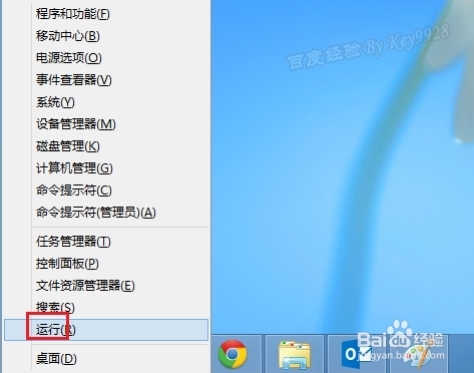
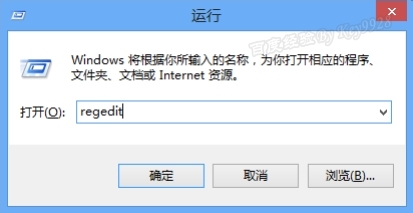
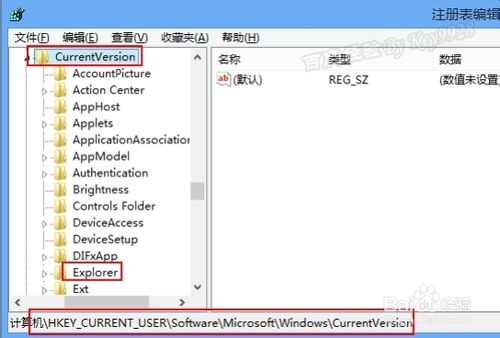
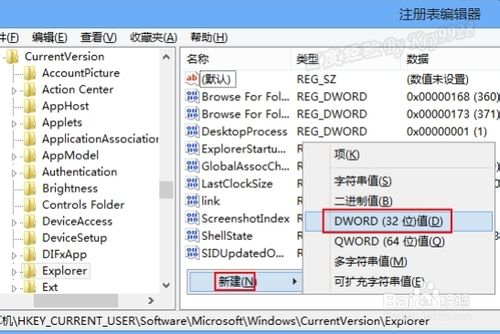
無觸控裝置安裝 Win8 可關閉 Metro 介面,開機直進傳統桌面:
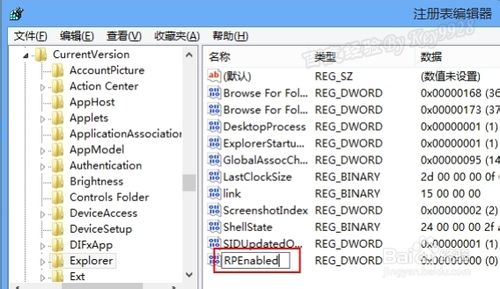
regedit
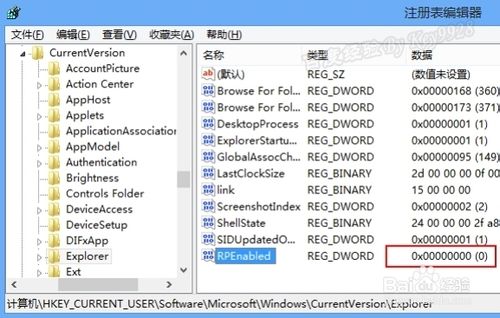
HKEY_CURRENT_USER\Software\Microsoft\Windows\CurrentVersion
RPEnabled
0
刪除 RPEnabled 鍵值 → 重啟即恢復開始畫面。
此法為註冊表層級修改,比第三方工具更乾淨無殘留。
Win10 系統最低硬體需求:比想像中更低,Win7 能跑的電腦基本都能升級
Windows 10 關閉遠端桌面與遠端協助:封鎖駭客入侵管道的安全加固指南
Windows 10 檔案總管主頁空白無內容?註冊表新增 DelegateFolders 索引鍵即可恢復庫顯示
Windows 8 激活方法完整教學:網路激活與電話激活雙管道
Windows 系統強制定期修改密碼:群組原則/命令列/排程工作 三管齊下,建立資安好習慣
Win7 Word 文件出現錯誤報告無法開啟?刪除 Normal 模板或安全模式重建文件解決
Windows 7 關閉 Aero 透明效果:開發者與低階機種釋放資源必學指令
VMware Workstation 完整圖文教學:安裝 Windows 10 消費者預覽版