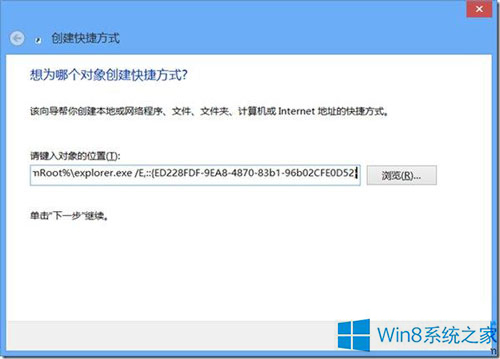
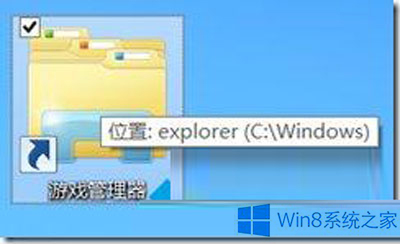
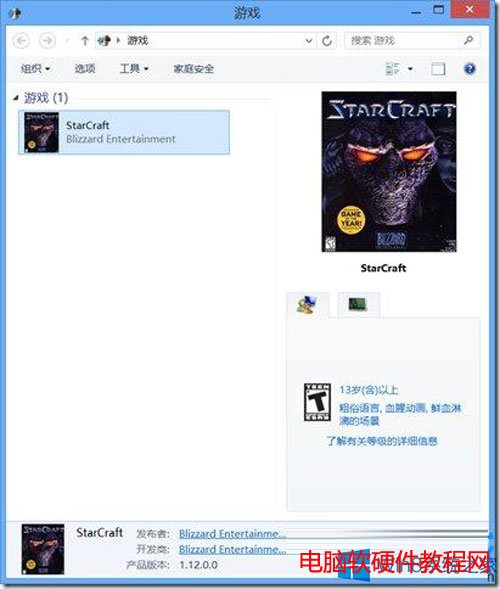
Windows 8 移除了開始選單中的「遊戲總管」,但功能仍保留於系統中。透過建立特定 GUID 的捷徑,即可快速存取遊戲總管管理已安裝的遊戲。
%SystemRoot%\explorer.exe /E,::{ED228FDF-9EA8-4870-83b1-96b02CFE0D52}
Win7 檔案共用按鈕變灰無法點選?啟用「使用共用精靈」即可恢復
Win8 系統清理 IE 瀏覽紀錄完整教學:保護個人隱私不外洩
Win10 推出第六波累積更新 KB3093266,修復網路連線問題
Win7 64位系統僅搜狗瀏覽器能上網?防火牆報錯原因與完整解決方案
Win10 10061 隱私權設定新增「無線模組」、「帳戶資訊」、「訊息」三大項:詳細圖文解析
Win10 藍牙搜尋不到裝置?確認硬體支援與正確開啟藍牙設定
Windows 7 自訂「傳送到」右鍵選單:新增常用程式捷徑
Win10 無法拖曳檔案?群組原則「禁止拖放」設為「已停用」即可恢復