Windows XP Windows 7 Windows 2003 Windows Vista Windows 綜合教學 Linux 系統教學
Windows 10 Windows 8 Windows 2008 Windows NT Windows Server 電腦軟體教學
您现在的位置: Windows教程網 >> Windows教程 >  >> Windows 綜合教學 >> 關於 Windows

Win 8.1 使用 DISM 指令清理 WinSxS 資料夾冗餘更新

編輯:關於 Windows

Windows 8.1 的 WinSxS 資料夾會隨著系統更新持續增大,佔用大量磁碟空間。透過內建的 DISM 工具,可安全移除已取代的更新元件,釋放空間。以下為詳細操作指令與說明。

清理步驟

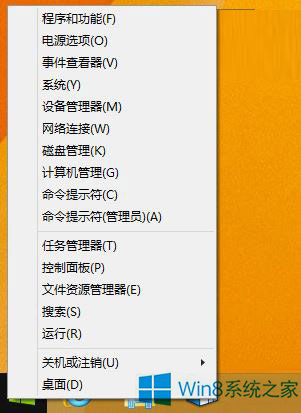
  1. 以系統管理員身分開啟「命令提示字元」:在傳統桌面右鍵「開始」按鈕,選擇「命令提示字元 (管理員)」。
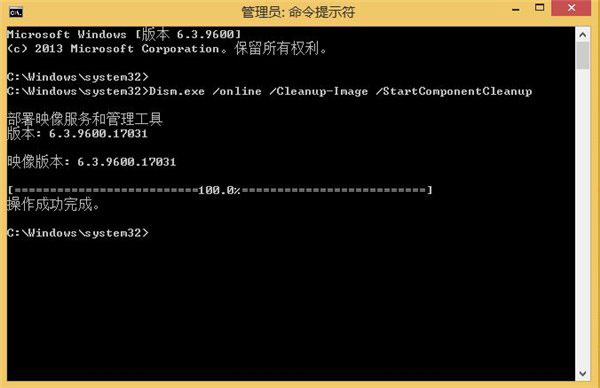
  2. 輸入下列指令執行標準清理(支援 Win 8.1 RTM 與 Update 版本):
    Dism.exe /online /Cleanup-Image /StartComponentCleanup
  3. 若確定不需解除安裝已安裝的更新,可加入 /ResetBase 參數進一步壓縮(注意:執行後無法移除現有更新,不支援 Win 8.1 Update 平台,請謹慎使用):
    Dism.exe /online /Cleanup-Image /StartComponentCleanup /ResetBase
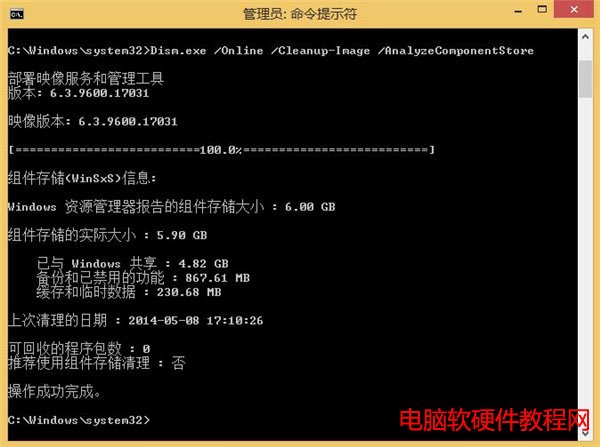
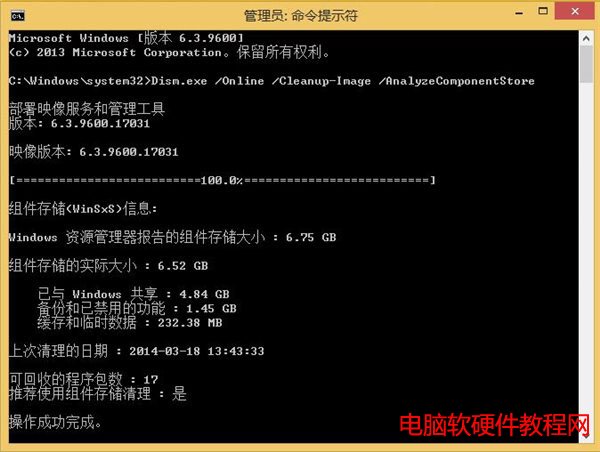
  4. 清理完成後,可用下列指令查詢目前 WinSxS 實際大小:
    Dism.exe /Online /Cleanup-Image /AnalyzeComponentStore
WinSxS 資料夾示意

管理員命令提示字元

DISM 指令執行畫面

分析元件存放區

善用 DISM 工具可有效精簡系統,對於硬體規格較舊的電腦效益顯著。
Copyright © Windows教程網 All Rights Reserved